Part 1
요약·해설
Pinnacle 100 DVK는 Cortex-M4F에서 Zephyr application을 실행하며 Bluetooth 5와 LTE-M/NB-IoT를 함께 제공합니다.
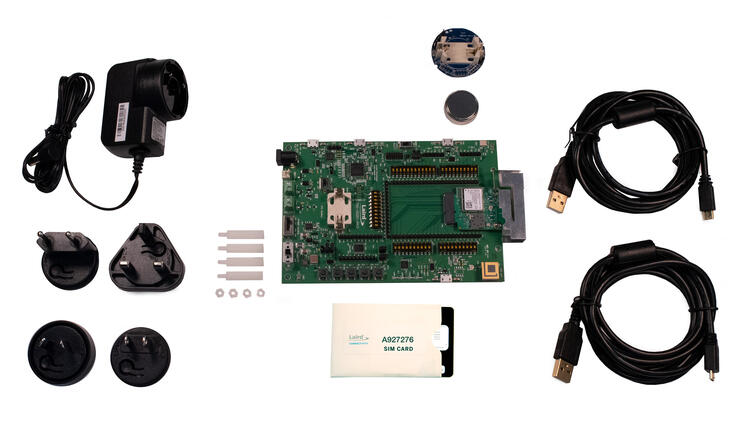
nRF52840 Cortex-M4F
HL7800 · ALT1250
BME680
Part 2
접을 수 있는 영어 원문 전체
영어 원문 전체 펼치기
34E5E6E68B1DF1B74DA1CFB9B31D1C813FC2D0AAF04B83E0451CE7C6B85B449D
.. _pinnacle_100_dvk:

Ezurio Pinnacle 100 DVK
#######################

Overview
********
The Pinnacle™ 100 cellular modem seamlessly incorporates a powerful Cortex M4F
controller, full Bluetooth 5 and LTE-M/NB-IoT capabilities – all with full
regulatory certifications and LTE carrier approvals. The Pinnacle 100 also
delivers complete antenna flexibility, with pre-integrated internal or external
antenna options such as the Revie Flex family of LTE and NB-IoT
internal antennas.

Develop your application directly on the M4F controller using Zephyr RTOS to
cut BOM costs and power consumption. Take advantage of the Zephyr community,
Ezurio’s sample code (cellular, Bluetooth) and hardware interfaces,
or use our hosted mode AT commands set firmware.

Extremely power conscious, the Pinnacle 100 is ideal for battery-powered
devices operating at the edge of your IoT networks, seamlessly bridging the
cellular WAN to BLE. It’s never been easier to bridge wireless
Bluetooth 5 sensor data to cloud services like AWS IoT over a
low-power LTE connection.

More information about the board can be found at the `Pinnacle 100 website`_.

The Pinnacle 100 Development Kit (453-00010-K1 or 453-00011-K1) hardware
provides support for the
Nordic Semiconductor nRF52840 ARM Cortex-M4F CPU, `Sierra Wireless HL7800`_ (Altair ALT1250)
and the following devices:

* :abbr:`ADC (Analog to Digital Converter)`
* CLOCK
* FLASH
* :abbr:`GPIO (General Purpose Input Output)`
* :abbr:`I2C (Inter-Integrated Circuit)`
* :abbr:`MPU (Memory Protection Unit)`
* :abbr:`NVIC (Nested Vectored Interrupt Controller)`
* :abbr:`PWM (Pulse Width Modulation)`
* RADIO (Bluetooth Low Energy and 802.15.4)
* :abbr:`RTC (nRF RTC System Clock)`
* Segger RTT (RTT Console)
* :abbr:`SPI (Serial Peripheral Interface)`
* :abbr:`UART (Universal asynchronous receiver-transmitter)`
* :abbr:`USB (Universal Serial Bus)`
* :abbr:`WDT (Watchdog Timer)`
* :abbr:`QSPI (Quad Serial Peripheral Interface)`
* :abbr:`BME680 (Bosch Sensortec BME680 environmental sensor)`
* :abbr:`HL7800 (Sierra Wireless HL7800 LTE-M1/NB-IoT modem)`

.. figure:: ../../../../../../../boards/ezurio/pinnacle_100_dvk/doc/img/pinnacle_100_dvk.jpg
     :align: center
     :alt: Pinnacle 100 DVK

     Pinnacle 100 DVK (453-00010-K1)

Hardware
********

Supported Features
==================

The Pinnacle 100 development board configuration supports the following
hardware features:

+-----------+------------+----------------------+
| Interface | Controller | Driver/Component     |
+===========+============+======================+
| ADC       | on-chip    | adc                  |
+-----------+------------+----------------------+
| CLOCK     | on-chip    | clock_control        |
+-----------+------------+----------------------+
| FLASH     | on-chip    | flash                |
+-----------+------------+----------------------+
| GPIO      | on-chip    | gpio                 |
+-----------+------------+----------------------+
| I2C(M)    | on-chip    | i2c                  |
+-----------+------------+----------------------+
| MPU       | on-chip    | arch/arm             |
+-----------+------------+----------------------+
| NVIC      | on-chip    | arch/arm             |
+-----------+------------+----------------------+
| PWM       | on-chip    | pwm                  |
+-----------+------------+----------------------+
| RADIO     | on-chip    | Bluetooth,           |
|           |            | ieee802154           |
+-----------+------------+----------------------+
| RTC       | on-chip    | system clock         |
+-----------+------------+----------------------+
| RTT       | Segger     | console              |
+-----------+------------+----------------------+
| SPI(M/S)  | on-chip    | spi                  |
+-----------+------------+----------------------+
| UART      | on-chip    | serial               |
+-----------+------------+----------------------+
| USB       | on-chip    | usb                  |
+-----------+------------+----------------------+
| WDT       | on-chip    | watchdog             |
+-----------+------------+----------------------+
| QSPI      | on-chip    | qspi/MX25R64(8MB)    |
+-----------+------------+----------------------+
| BME680    | I2C(M)     | sensor/bme680        |
+-----------+------------+----------------------+
| HL7800    | UART       | HL7800 modem driver  |
+-----------+------------+----------------------+

See `Pinnacle 100 website`_ for a complete list
of Pinnacle 100 Development Kit hardware features.

Connections and IOs
===================

LED
---

* LED1 (blue)  = P1.4
* LED2 (green) = P1.5
* LED3 (red)   = P1.6
* LED4 (green) = P1.7

Push buttons
------------

* BUTTON1 = SW1 = P0.31
* BUTTON2 = SW2 = P0.3
* BUTTON3 = SW3 = P0.4
* BUTTON4 = SW4 = P0.2
* NRF RESET = SW5 = reset

Programming and Debugging
*************************

Applications for the ``pinnacle_100_dvk`` board configuration can be
built and flashed in the usual way. (see :ref:`build_an_application`
and :ref:`application_run` for more details)

Flashing
========

Follow the instructions in the :ref:`nordic_segger` page to install
and configure all the necessary software. Further information can be
found in :ref:`nordic_segger_flashing`. Then build and flash
applications as usual (see :ref:`build_an_application` and
:ref:`application_run` for more details).

Here is an example for the :ref:`hello_world` application.

First, run your favorite terminal program to listen for output.

.. note:: On the Pinnacle 100 development board,
   the FTDI USB should be used to access the UART console.

.. code-block:: console

   $ minicom -D <tty_device> -b 115200

Replace :code:`<tty_device>` with the port where the board Pinnacle 100 DVK
can be found. For example, under Linux, :code:`/dev/ttyUSB0`.

Then build and flash the application in the usual way.

.. zephyr-app-commands::
   :zephyr-app: samples/hello_world
   :board: pinnacle_100_dvk
   :goals: build flash

Debugging
=========

Refer to the :ref:`nordic_segger` page to learn about debugging Nordic boards with a
Segger IC.

Software
********

Canvas Software Suite
==============================
The Pinnacle 100 is a supported hardware platform for `Canvas Software Suite`_.

Sample Applications
===================
`Pinnacle 100 Sample Applications`_ are available.

Testing Bluetooth on the Pinnacle 100 DVK
=========================================
Many of the Bluetooth examples will work on the Pinnacle 100 DVK.
Try them out:

* :ref:`ble_peripheral`
* :ref:`bluetooth-eddystone-sample`
* :ref:`bluetooth-ibeacon-sample`

Testing the LEDs and buttons in the Pinnacle 100 DVK
====================================================

There are 2 samples that allow you to test that the buttons (switches) and LEDs on
the board are working properly with Zephyr:

.. code-block:: console

   samples/basic/blinky
   samples/basic/button

You can build and flash the examples to make sure Zephyr is running correctly on
your board. The button and LED definitions can be found in
:zephyr_file:`boards/ezurio/pinnacle_100_dvk/pinnacle_100_dvk.dts`.

References
**********

.. target-notes::

.. _Pinnacle 100 website: https://www.ezurio.com/wireless-modules/cellular-solutions/pinnacle-100-cellular-modem
.. _nRF52840 Product Specification: https://infocenter.nordicsemi.com/pdf/nRF52840_PS_v1.1.pdf
.. _Sierra Wireless HL7800: https://source.sierrawireless.com/devices/hl-series/hl7800/#sthash.641qTTwA.dpbs
.. _J-Link Software and documentation pack: https://www.segger.com/jlink-software.html
.. _Pinnacle 100 Sample Applications: https://github.com/LairdCP/Pinnacle_100_Sample_Applications
.. _Canvas Software Suite: https://www.ezurio.com/canvas/software-suite
Part 3
한국어 전문 번역
개요
Pinnacle 100 cellular modem은 강력한 Cortex-M4F controller, 완전한 Bluetooth 5와 LTE-M/NB-IoT 기능을 regulatory certification과 LTE carrier approval과 함께 통합합니다. Revie Flex LTE/NB-IoT internal antenna family 같은 사전 통합 internal/external antenna option으로 완전한 antenna 유연성도 제공합니다.
M4F controller에서 Zephyr RTOS로 application을 직접 개발해 BOM cost와 power consumption을 줄일 수 있습니다. Zephyr community, Ezurio cellular·Bluetooth sample code와 hardware interface를 활용하거나 hosted-mode AT-command-set firmware를 사용할 수 있습니다.
전력 사용을 크게 의식해 설계된 Pinnacle 100은 IoT network edge의 battery-powered device에 적합하며 cellular WAN과 BLE를 연결합니다. Bluetooth 5 sensor data를 low-power LTE connection을 통해 AWS IoT 같은 cloud service로 전달할 수 있습니다.
Board 정보는 Pinnacle 100 website에서 확인할 수 있습니다.
Pinnacle 100 Development Kit(453-00010-K1 또는 453-00011-K1)는 Nordic Semiconductor nRF52840 ARM Cortex-M4F CPU, Sierra Wireless HL7800(Altair ALT1250)과 다음 device를 지원합니다.
- ADC(Analog-to-Digital Converter)
- CLOCK
- FLASH
- GPIO(General Purpose Input/Output)
- I2C(Inter-Integrated Circuit)
- MPU(Memory Protection Unit)
- NVIC(Nested Vectored Interrupt Controller)
- PWM(Pulse Width Modulation)
- RADIO(Bluetooth Low Energy와 802.15.4)
- RTC(nRF RTC System Clock)
- Segger RTT(RTT Console)
- SPI(Serial Peripheral Interface)
- UART(Universal asynchronous receiver-transmitter)
- USB(Universal Serial Bus)
- WDT(Watchdog Timer)
- QSPI(Quad Serial Peripheral Interface)
- BME680(Bosch Sensortec BME680 environmental sensor)
- HL7800(Sierra Wireless HL7800 LTE-M1/NB-IoT modem)
Hardware
지원 기능
Pinnacle 100 development board configuration은 다음 hardware 기능을 지원합니다.
| Interface | Controller | Driver/Component |
|---|---|---|
| ADC | on-chip | adc |
| CLOCK | on-chip | clock_control |
| FLASH | on-chip | flash |
| GPIO | on-chip | gpio |
| I2C(M) | on-chip | i2c |
| MPU | on-chip | arch/arm |
| NVIC | on-chip | arch/arm |
| PWM | on-chip | pwm |
| RADIO | on-chip | Bluetooth, ieee802154 |
| RTC | on-chip | system clock |
| RTT | Segger | console |
| SPI(M/S) | on-chip | spi |
| UART | on-chip | serial |
| USB | on-chip | usb |
| WDT | on-chip | watchdog |
| QSPI | on-chip | qspi/MX25R64(8MB) |
| BME680 | I2C(M) | sensor/bme680 |
| HL7800 | UART | HL7800 modem driver |
Pinnacle 100 Development Kit hardware 기능 전체 목록은 Pinnacle 100 website를 참조하십시오.
연결과 I/O
LED
- LED1(blue) = P1.4
- LED2(green) = P1.5
- LED3(red) = P1.6
- LED4(green) = P1.7
Push button
- BUTTON1 = SW1 = P0.31
- BUTTON2 = SW2 = P0.3
- BUTTON3 = SW3 = P0.4
- BUTTON4 = SW4 = P0.2
- NRF RESET = SW5 = reset
Programming과 Debugging
pinnacle_100_dvk board configuration용 application은 일반적인 방법으로 build하고 flash할 수 있습니다.
Flashing
Nordic Segger 안내에 따라 필요한 software를 설치·구성한 뒤 일반적인 방법으로 application을 build하고 flash합니다.
다음은 hello_world application 예입니다. 먼저 terminal program으로 output을 수신합니다.
$ minicom -D <tty_device> -b 115200<tty_device>를 Pinnacle 100 DVK가 연결된 port로 바꿉니다. Linux 예시는 /dev/ttyUSB0입니다.
그다음 일반적인 방법으로 application을 build하고 flash합니다.
west build -b pinnacle_100_dvk samples/hello_world
west flash
Debugging
Segger IC를 사용하는 Nordic board의 debugging 방법은 Nordic Segger 안내를 참조하십시오.
Software
Canvas Software Suite
Pinnacle 100은 Canvas Software Suite 지원 hardware platform입니다.
Sample Application
Pinnacle 100 Sample Applications를 사용할 수 있습니다.
Pinnacle 100 DVK에서 Bluetooth 시험
많은 Bluetooth example이 Pinnacle 100 DVK에서 동작합니다. Bluetooth LE peripheral, Eddystone, iBeacon sample을 시험해 보십시오.
Pinnacle 100 DVK LED와 button 시험
Board의 button과 LED를 시험하는 sample은 다음 두 개입니다.
samples/basic/blinky
samples/basic/button
Example을 build·flash하여 Zephyr 동작을 확인할 수 있습니다. Button과 LED 정의는 boards/ezurio/pinnacle_100_dvk/pinnacle_100_dvk.dts에 있습니다.
참고 자료
Source
출처
영어 원문에는 문단, 문서 지시문, 표, 코드, 코드 심벌, 경로를 그대로 보존했습니다.