Part 1
요약·해설
BL654 DVK는 nRF52840 기반 BL654와 pin-compatible BL654PA를 지원하고 four LED, four button, FTDI UART와 Segger debug를 제공합니다.
nRF52840 · Cortex-M4F
Bluetooth LE · 802.15.4
bl654_dvk · pa variant
Part 2
접을 수 있는 영어 원문 전체
영어 원문 전체 펼치기
0B4E49A86390D36679A17D566590C12CA4FAF06D683A0C1C9DC8C6ACA60BC195
.. _bl654_dvk:

Ezurio BL654 DVK
################

Overview
********

The BL654 Development Kit hardware provides
support for the Ezurio BL654 module powered by a Nordic Semiconductor nRF52840 ARM Cortex-M4F CPU.

It is also pin compatible with the BL654PA which adds a power amplifier. The "pa" variant provides
this compatibility. Use board ``bl654_dvk/nrf52840/pa`` to build for that target.
Bluetooth LE regulatory certifications obtained by Ezurio are not applicable to BL654PA variant.
It should not be used in commercial applications prior to re-certification being performed - please review with the Ezurio team at www.ezurio.com/contact

This development kit has the following features:

* :abbr:`ADC (Analog to Digital Converter)`
* CLOCK
* FLASH
* :abbr:`GPIO (General Purpose Input Output)`
* :abbr:`I2C (Inter-Integrated Circuit)`
* :abbr:`MPU (Memory Protection Unit)`
* :abbr:`NVIC (Nested Vectored Interrupt Controller)`
* :abbr:`PWM (Pulse Width Modulation)`
* RADIO (Bluetooth Low Energy and 802.15.4)
* :abbr:`RTC (nRF RTC System Clock)`
* Segger RTT (RTT Console)
* :abbr:`SPI (Serial Peripheral Interface)`
* :abbr:`UART (Universal asynchronous receiver-transmitter)`
* :abbr:`USB (Universal Serial Bus)`
* :abbr:`WDT (Watchdog Timer)`

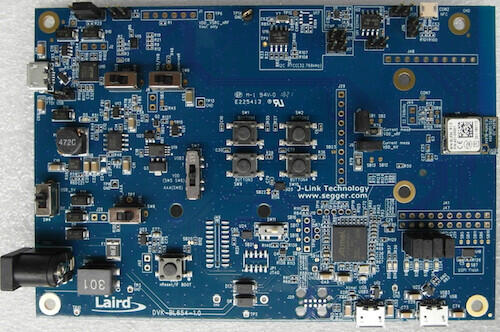
.. figure:: ../../../../../../../boards/ezurio/bl654_dvk/doc/img/bl654_dvk.jpg
     :align: center
     :alt: BL654 Development Kit

     BL654 Development Kit Board

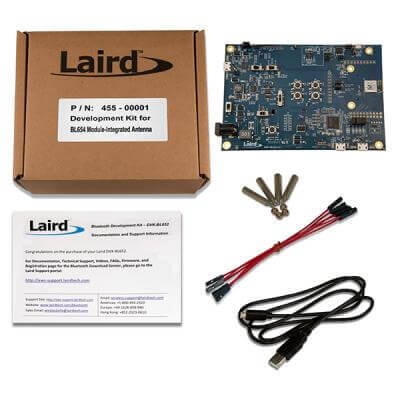
.. figure:: ../../../../../../../boards/ezurio/bl654_dvk/doc/img/455-00001_BoxContents.jpg
     :align: center
     :alt: 455-00001 Box Contents

     455-00001 (BL654 DVK integrated antenna) Box Contents

More information about the board can be found at the
`BL654 website`_.

Hardware
********

Supported Features
==================

The BL654 DVK board configuration supports the following
hardware features:

+-----------+------------+----------------------+
| Interface | Controller | Driver/Component     |
+===========+============+======================+
| ADC       | on-chip    | adc                  |
+-----------+------------+----------------------+
| CLOCK     | on-chip    | clock_control        |
+-----------+------------+----------------------+
| FLASH     | on-chip    | flash                |
+-----------+------------+----------------------+
| GPIO      | on-chip    | gpio                 |
+-----------+------------+----------------------+
| I2C(M)    | on-chip    | i2c                  |
+-----------+------------+----------------------+
| MPU       | on-chip    | arch/arm             |
+-----------+------------+----------------------+
| NVIC      | on-chip    | arch/arm             |
+-----------+------------+----------------------+
| PWM       | on-chip    | pwm                  |
+-----------+------------+----------------------+
| RADIO     | on-chip    | Bluetooth,           |
|           |            | ieee802154           |
+-----------+------------+----------------------+
| RTC       | on-chip    | system clock         |
+-----------+------------+----------------------+
| RTT       | Segger     | console              |
+-----------+------------+----------------------+
| SPI(M/S)  | on-chip    | spi                  |
+-----------+------------+----------------------+
| UART      | on-chip    | serial               |
+-----------+------------+----------------------+
| USB       | on-chip    | usb                  |
+-----------+------------+----------------------+
| WDT       | on-chip    | watchdog             |
+-----------+------------+----------------------+

Other hardware features have not been enabled yet for this board.
See `BL654 website`_
for a complete list of BL654 Development Kit board hardware features.

Connections and IOs
===================

LED
---

* LED1 (blue) = P0.13
* LED2 (blue) = P0.14
* LED3 (blue) = P0.15
* LED4 (blue) = P0.16

Push buttons
------------

* BUTTON1 = SW1 = P0.11
* BUTTON2 = SW2 = P0.12
* BUTTON3 = SW9 = P0.24
* BUTTON4 = SW10 = P0.25
* RESET = SW3 = nReset/IF BOOT

Programming and Debugging
*************************

Applications for the ``bl654_dvk`` board configuration can be built, flashed,
and debugged in the usual way. See :ref:`build_an_application` and
:ref:`application_run` for more details on building and running.

Flashing
========

Follow the instructions in the :ref:`nordic_segger` page to install
and configure all the necessary software. Further information can be
found in :ref:`nordic_segger_flashing`. Then build and flash
applications as usual (see :ref:`build_an_application` and
:ref:`application_run` for more details).

Here is an example for the :ref:`hello_world` application.

First, run your favorite terminal program to listen for output.

NOTE: On the BL654 DVK, the FTDI USB should be used to access the UART console.

.. code-block:: console

   $ minicom -D <tty_device> -b 115200

Replace :code:`<tty_device>` with the port where the board nRF52 DK
can be found. For example, under Linux, :code:`/dev/ttyUSB0`.

Then build and flash the application in the usual way.

.. zephyr-app-commands::
   :zephyr-app: samples/hello_world
   :board: bl654_dvk
   :goals: build flash

Debugging
=========

Refer to the :ref:`nordic_segger` page to learn about debugging Nordic based boards with a
Segger IC.

Testing Bluetooth on the BL654 DVK
***********************************
Many of the Bluetooth examples will work on the BL654 DVK.
Try them out:

* :ref:`ble_peripheral`
* :ref:`bluetooth-eddystone-sample`
* :ref:`bluetooth-ibeacon-sample`


Testing the LEDs and buttons on the BL654 DVK
************************************************

There are 2 samples that allow you to test that the buttons (switches) and LEDs on
the board are working properly with Zephyr:

* :zephyr:code-sample:`blinky`
* :zephyr:code-sample:`button`

You can build and flash the examples to make sure Zephyr is running correctly on
your board. The button and LED definitions can be found in
:zephyr_file:`boards/ezurio/bl654_dvk/bl654_dvk.dts`.


References
**********

.. target-notes::

.. _BL654 website: https://ezurio.com/wireless-modules/bluetooth-modules/bluetooth-5-modules/bl654-series
.. _J-Link Software and documentation pack: https://www.segger.com/jlink-software.html
Part 3
한국어 전문 번역
개요
BL654 Development Kit hardware는 Nordic Semiconductor nRF52840 ARM Cortex-M4F CPU 기반 Ezurio BL654 module을 지원합니다.
Power amplifier를 추가한 BL654PA와도 pin-compatible합니다. 이 호환 target은 pa variant이며 bl654_dvk/nrf52840/pa로 build합니다.
Development kit 기능은 ADC, CLOCK, FLASH, GPIO, I2C, MPU, NVIC, PWM, Bluetooth LE·802.15.4 RADIO, RTC, Segger RTT console, SPI, UART, USB와 WDT입니다.
Hardware
지원 기능
BL654 DVK board configuration이 지원하는 hardware는 다음과 같습니다. 그 밖의 hardware feature는 아직 board에서 활성화되지 않았습니다.
| Interface | Controller | Driver/Component |
|---|---|---|
| ADC | on-chip | adc |
| CLOCK | on-chip | clock_control |
| FLASH | on-chip | flash |
| GPIO | on-chip | gpio |
| I2C(M) | on-chip | i2c |
| MPU | on-chip | arch/arm |
| NVIC | on-chip | arch/arm |
| PWM | on-chip | pwm |
| RADIO | on-chip | Bluetooth, ieee802154 |
| RTC | on-chip | system clock |
| RTT | Segger | console |
| SPI(M/S) | on-chip | spi |
| UART | on-chip | serial |
| USB | on-chip | usb |
| WDT | on-chip | watchdog |
연결과 I/O
Blue LED는 LED1=P0.13, LED2=P0.14, LED3=P0.15, LED4=P0.16입니다.
Push button은 BUTTON1=SW1=P0.11, BUTTON2=SW2=P0.12, BUTTON3=SW9=P0.24, BUTTON4=SW10=P0.25이며 RESET은 SW3=nReset/IF BOOT입니다.
Programming과 Debugging
bl654_dvk application은 일반적인 Zephyr 방식으로 build, flash, debug할 수 있습니다.
Flashing
Nordic board용 Segger software를 설치·구성한 뒤 application을 build하고 flash합니다. 먼저 terminal에서 output을 수신하십시오.
minicom -D <tty_device> -b 115200<tty_device>는 board port로 바꿉니다. Linux 예시는 /dev/ttyUSB0입니다.
west build -b bl654_dvk samples/hello_world
west flash
Debugging
Nordic 기반 board는 Segger IC와 Nordic Segger 절차로 debug합니다.
Bluetooth 시험
BL654 DVK에서 Bluetooth peripheral, Eddystone과 iBeacon sample을 시험할 수 있습니다.
samples/bluetooth/peripheral- Bluetooth Eddystone sample
- Bluetooth iBeacon sample
LED와 button 시험
blinky와 button sample로 switch와 LED가 정상 동작하는지 확인할 수 있습니다. 정의는 boards/ezurio/bl654_dvk/bl654_dvk.dts에 있습니다.
참고 자료
Source
출처
영어 원문에는 문단, 문서 지시문, 표, 코드, 코드 심벌, 경로를 그대로 보존했습니다.