Part 1
요약·해설
Digilent Zybo는 Zynq-7000 AP SoC의 dual-core Cortex-A9와 7-series FPGA logic을 결합합니다. Zephyr 실행 전 U-Boot SPL 등으로 SoC를 초기화해야 하며 JTAG 또는 FAT32 microSD로 application을 load할 수 있습니다.
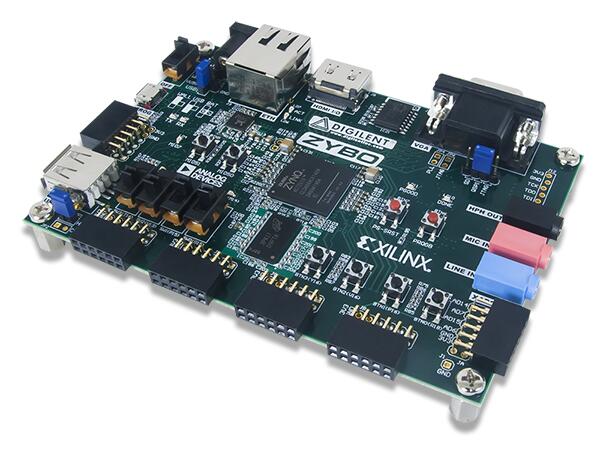
Xilinx Zynq-7000 AP SoC
Dual-core Arm Cortex-A9
JTAG · U-Boot · FAT32 microSD
Part 2
접을 수 있는 영어 원문 전체
영어 원문 전체 펼치기
8A898DD225A0E9478373E1866CD14E2593C0CC2EDC5447B9ABF573E4FD53FEDA
.. _zybo:

Digilent Zybo
#############

Overview
********

The `Digilent Zybo`_ (ZYnq BOard) is a feature-rich, ready-to-use embedded software and digital
circuit development board. It is built around the Xilinx Zynq-7000 family, which is based on the
Xilinx All Programmable System-on-Chip (AP SoC) architecture. This architecture tightly integrates a
dual-core ARM Cortex-A9 processor with Xilinx 7-series Field Programmable Gate Array (FPGA) logic.

.. figure:: ../../../../../../../boards/digilent/zybo/doc/zybo-0.jpg
   :align: center
   :alt: Digilent Zybo

   Digilent (Credit: Digilent)

Hardware
********

Supported Features
==================

The zybo board configuration supports the following hardware features:

+------------+------------+-------------------------------------+
| Interface  | Controller | Driver/Component                    |
+============+============+=====================================+
| GICv1      | on-chip    | ARM generic interrupt controller v1 |
+------------+------------+-------------------------------------+
| ARCH TIMER | on-chip    | ARM architected timer               |
+------------+------------+-------------------------------------+
| PINCTRL    | on-chip    | pinctrl                             |
+------------+------------+-------------------------------------+
| GPIO       | on-chip    | gpio                                |
+------------+------------+-------------------------------------+
| UART       | on-chip    | serial port-polling;                |
|            |            | serial port-interrupt               |
+------------+------------+-------------------------------------+

The default configuration can be found in
:zephyr_file:`boards/digilent/zybo/zybo_defconfig`

Other hardware features are not currently supported by the port.

Programming and Debugging
*************************

The Zynq-7000 series SoC needs to be initialized prior to running a Zephyr application. This can be
achieved in a number of ways (e.g. using the Xilinx First Stage Boot Loader (FSBL), the Xilinx
Vivado generated ``ps_init.tcl`` JTAG script, Das U-Boot Secondary Program Loader (SPL), ...).

The instructions here use the U-Boot SPL. For further details and instructions for using Das U-Boot
with Xilinx Zynq-7000 series SoCs, see the following documentation:

- `Das U-Boot Website`_
- `Using Distro Boot With Xilinx U-Boot`_

Building Das U-Boot
===================

Clone and build Das U-Boot for the Digilent Zybo:

.. code-block:: console

   git clone -b v2022.04 https://source.denx.de/u-boot/u-boot.git
   cd u-boot
   make distclean
   make xilinx_zynq_virt_defconfig
   export PATH=/path/to/zephyr-sdk/arm-zephyr-eabi/bin/:$PATH
   export CROSS_COMPILE=arm-zephyr-eabi-
   export DEVICE_TREE="zynq-zybo"
   make

Flashing
========

Here is an example for running the :ref:`hello_world` application via JTAG.

Ensure the board is configured for JTAG boot, open a serial terminal, turn on/reset the board (press
the ``PS-SRST`` button), and initialize the Zynq-7000 series SoC by uploading and running the U-Boot
SPL via JTAG.

Next, upload and run the Zephyr application:

.. zephyr-app-commands::
   :zephyr-app: samples/hello_world
   :board: zybo
   :goals: flash

You should see the following message in the terminal:

.. code-block:: console

   *** Booting Zephyr OS vx.xx.x-xxx-gxxxxxxxxxxxx ***
   Hello World! zybo

Another option is to load and run the :ref:`hello_world` application via U-Boot. Copy
``u-boot/spl/boot.bin``, ``u-boot/u-boot.img``, and ``zephyr/zephyr.bin`` to a FAT32 formatted
microSD card, insert the card in the ``SD MICRO`` slot on the Zybo board, ensure the board is
configured for ``SD`` boot, and turn on the board.

Once U-boot is done initializing, load an run the Zephyr application:

.. code-block:: console

   Zynq> fatload mmc 0 0x0 zephyr.bin
   817120 bytes read in 56 ms (13.9 MiB/s)
   Zynq> go 0x0
   ## Starting application at 0x00000000 ...
   *** Booting Zephyr OS vx.xx.x-xxx-gxxxxxxxxxxxx ***
   Hello World! zybo

Debugging
=========

Here is an example for the :ref:`hello_world` application.

Ensure the board is configured for JTAG boot, open a serial terminal, turn on/reset the board (press
the ``PS-SRST`` button), and initialize the Zynq-7000 series SoC by uploading and running the U-Boot
SPL via JTAG.

Next, upload and debug the Zephyr application:

.. zephyr-app-commands::
   :zephyr-app: samples/hello_world
   :board: zybo
   :goals: debug

Step through the application in your debugger, and you should see the following message in the
terminal:

.. code-block:: console

   *** Booting Zephyr OS vx.x.x-xxx-gxxxxxxxxxxxx ***
   Hello World! zybo

.. _Digilent Zybo:
   https://digilent.com/reference/programmable-logic/zybo/start

.. _Das U-Boot Website:
   https://www.denx.de/wiki/U-Boot

.. _Using Distro Boot With Xilinx U-Boot:
   https://xilinx-wiki.atlassian.net/wiki/spaces/A/pages/749142017/Using+Distro+Boot+With+Xilinx+U-Boot
Part 3
한국어 전문 번역
개요
Digilent Zybo(ZYnq BOard)는 기능이 풍부하고 바로 사용할 수 있는 embedded software·digital circuit development board입니다. Xilinx All Programmable System-on-Chip(AP SoC) architecture 기반 Zynq-7000 family를 중심으로 설계됐습니다. 이 architecture는 dual-core Arm Cortex-A9 processor와 Xilinx 7-series FPGA logic을 긴밀하게 통합합니다.
하드웨어
지원 기능
Zybo board configuration은 다음 hardware 기능을 지원합니다.
| Interface | Controller | Driver/Component |
|---|---|---|
| GICv1 | on-chip | Arm generic interrupt controller v1 |
| ARCH TIMER | on-chip | Arm architected timer |
| PINCTRL | on-chip | pinctrl |
| GPIO | on-chip | gpio |
| UART | on-chip | serial port-polling; serial port-interrupt |
기본 configuration은 boards/digilent/zybo/zybo_defconfig에 있습니다. 다른 hardware 기능은 현재 이 port에서 지원하지 않습니다.
프로그래밍과 디버깅
Zynq-7000 series SoC는 Zephyr application을 실행하기 전에 초기화해야 합니다. Xilinx FSBL(First Stage Boot Loader), Xilinx Vivado가 생성한 ps_init.tcl JTAG script, Das U-Boot SPL(Secondary Program Loader) 등 여러 방법을 사용할 수 있습니다.
여기서는 U-Boot SPL을 사용합니다. Xilinx Zynq-7000 series SoC에서 Das U-Boot을 사용하는 자세한 내용은 Das U-Boot Website와 Using Distro Boot With Xilinx U-Boot 문서를 참고하십시오.
Das U-Boot build
Digilent Zybo용 Das U-Boot을 clone하고 build합니다.
git clone -b v2022.04 https://source.denx.de/u-boot/u-boot.git
cd u-boot
make distclean
make xilinx_zynq_virt_defconfig
export PATH=/path/to/zephyr-sdk/arm-zephyr-eabi/bin/:$PATH
export CROSS_COMPILE=arm-zephyr-eabi-
export DEVICE_TREE="zynq-zybo"
make
Flashing
다음은 JTAG로 hello_world application을 실행하는 예입니다.
board를 JTAG boot로 구성하고 serial terminal을 연 뒤 board를 켜거나 PS-SRST button을 눌러 reset합니다. JTAG로 U-Boot SPL을 upload하고 실행해 Zynq-7000 series SoC를 초기화합니다.
그 다음 Zephyr application을 upload하고 실행합니다.
west build -b zybo samples/hello_world
west flash
terminal에 다음 message가 보여야 합니다.
*** Booting Zephyr OS vx.xx.x-xxx-gxxxxxxxxxxxx ***
Hello World! zybo
U-Boot으로 hello_world를 load하고 실행하는 방법도 있습니다. u-boot/spl/boot.bin, u-boot/u-boot.img, zephyr/zephyr.bin을 FAT32로 format한 microSD card에 복사합니다. card를 Zybo의 SD MICRO slot에 넣고 board를 SD boot로 구성한 다음 전원을 켭니다.
U-Boot 초기화가 끝나면 Zephyr application을 load하고 실행합니다.
Zynq> fatload mmc 0 0x0 zephyr.bin
817120 bytes read in 56 ms (13.9 MiB/s)
Zynq> go 0x0
## Starting application at 0x00000000 ...
*** Booting Zephyr OS vx.xx.x-xxx-gxxxxxxxxxxxx ***
Hello World! zybo
Debugging
다음은 hello_world 예입니다. board를 JTAG boot로 구성하고 serial terminal을 연 뒤 board를 켜거나 PS-SRST button을 눌러 reset합니다. JTAG로 U-Boot SPL을 upload하고 실행해 SoC를 초기화합니다.
그 다음 Zephyr application을 upload하고 debug합니다.
west build -b zybo samples/hello_world
west debug
debugger에서 application을 한 단계씩 실행하면 terminal에 다음 message가 보여야 합니다.
*** Booting Zephyr OS vx.x.x-xxx-gxxxxxxxxxxxx ***
Hello World! zybo
참고 자료
Source
출처
영어 원문에는 문단, 문서 지시문, 표, 코드, 코드 심벌, 경로를 그대로 보존했습니다.