Part 1
요약·해설
ctcc/nrf52840은 mPCIe·M.2 form factor에서 USB를 이용해 BLE와 IEEE 802.15.4를 제공합니다. 외부 J-Link SWD와 MCUboot DFU 두 programming 경로를 지원합니다.
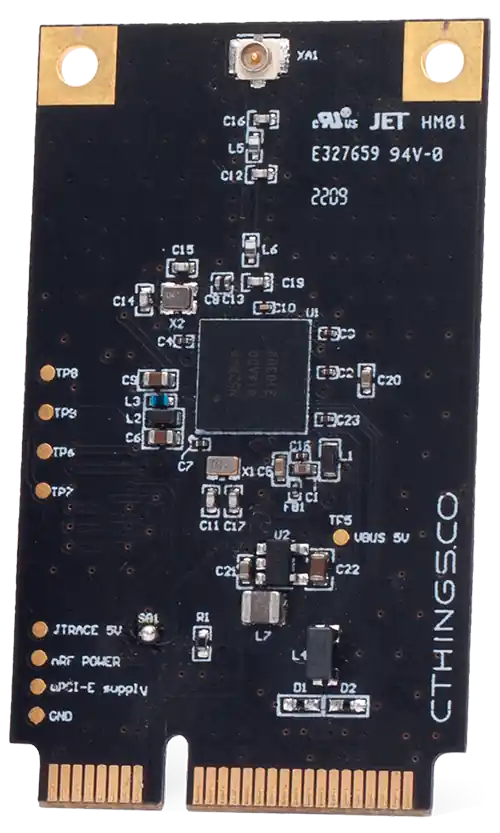
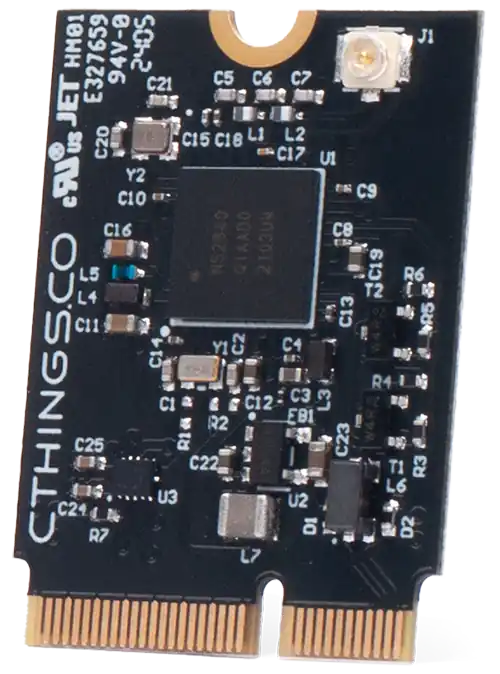
mPCIe · M.2
USB · BLE · IEEE 802.15.4
External J-Link · MCUboot DFU
Part 2
접을 수 있는 영어 원문 전체
영어 원문 전체 펼치기
06CBF09541760F2B4E150D94EB7D2387917054870F7FA300BD99E085A71BCB82
.. _ctcc_nrf52840:

CTHINGS.CO Connectivity Card nRF52840
#####################################

Overview
********

The Connectivity Card nRF52840 enables BLE and IEEE 802.15.4 connectivity
over mPCIe or M.2 using USB port with on-board nRF52840 SoC.

This board has following features:

* CLOCK
* FLASH
* :abbr:`GPIO (General Purpose Input Output)`
* :abbr:`MPU (Memory Protection Unit)`
* :abbr:`NVIC (Nested Vectored Interrupt Controller)`
* RADIO (Bluetooth Low Energy and 802.15.4)
* :abbr:`RTC (nRF RTC System Clock)`
* :abbr:`USB (Universal Serial Bus)`
* :abbr:`WDT (Watchdog Timer)`

.. figure:: ../../../../../../../boards/ct/ctcc/doc/img/ctcc_nrf52840_mpcie.webp
     :align: center
     :alt: CTCC nRF52840 mPCIe

     ctcc/nrf52840 mPCie board

.. figure:: ../../../../../../../boards/ct/ctcc/doc/img/ctcc_nrf52840_m2.webp
     :align: center
     :alt: CTCC nRF52840 M.2

     ctcc/nrf52840 M.2 board

More information about the board can be found at the
`ctcc_nrf52840 Website`_ and for SoC information: `Nordic Semiconductor Infocenter`_.

Hardware
********

The ``ctcc/nrf52840`` board target has one external oscillator of the 32.768 kHz.

Supported Features
==================

The ``ctcc/nrf52840`` board target supports the following
hardware features:

+-----------+------------+----------------------+
| Interface | Controller | Driver/Component     |
+===========+============+======================+
| CLOCK     | on-chip    | clock_control        |
+-----------+------------+----------------------+
| FLASH     | on-chip    | flash                |
+-----------+------------+----------------------+
| GPIO      | on-chip    | gpio                 |
+-----------+------------+----------------------+
| MPU       | on-chip    | arch/arm             |
+-----------+------------+----------------------+
| NVIC      | on-chip    | arch/arm             |
+-----------+------------+----------------------+
| RADIO     | on-chip    | Bluetooth,           |
|           |            | ieee802154           |
+-----------+------------+----------------------+
| RTC       | on-chip    | system clock         |
+-----------+------------+----------------------+
| USB       | on-chip    | usb                  |
+-----------+------------+----------------------+
| WDT       | on-chip    | watchdog             |
+-----------+------------+----------------------+

Connections and IOs
===================

LED
---

Note that board does not have on-board LEDs, however it exposes
LED signals on mPCIe/M.2 pins.

* LED1 = P0.23
* LED2 = P0.22

Programming and Debugging
*************************

Applications for the ``ctcc/nrf52840`` board target can be
built in the usual way (see :ref:`build_an_application` for more details).

Flashing
========

The board supports the following programming options:

1. Using an external :ref:`debug probe <debug-probes>`
2. Using MCUboot with DFU support

Option 1: Using an External Debug Probe
---------------------------------------

Connectivity Card can be programmed using an external debug probe (Segger J-Link) by connecting
to on-board SWD test pads.

For Segger J-Link debug probes, follow the instructions in the
:ref:`nordic_segger` page to install and configure all the necessary
software. Further information can be found in :ref:`nordic_segger_flashing`.

Then build and flash applications as usual (see :ref:`build_an_application` and
:ref:`application_run` for more details).

Here is an example for the :zephyr:code-sample:`usb-cdc-acm-console` application which prints out
logs on emulated USB port.

.. zephyr-app-commands::
   :zephyr-app: samples/subsys/usb/console
   :board: ctcc/nrf52840
   :goals: build flash

Debugging
=========

The ``ctcc/nrf52840`` board target does not have an on-board J-Link debug IC, however
instructions from the :ref:`nordic_segger` page also apply to this board,
with the additional step of connecting an external debugger.

Option 2: Using MCUboot with DFU support
----------------------------------------

It is also possible to use the MCUboot bootloader with DFU support to flash
Zephyr applications. You need to flash MCUboot with DFU support and fill in slot0 with
some application one-time using Option 1. Then you can re-flash an application using DFU utility
by loading images to slot1. Note, it's not possible to have only MCUboot and load directly
software to slot0 due to DFU implementation in Zephyr, which for present slot0 and slot1 in flash
map, it assumes only slot1 partition as writeable.

Install ``dfu-util`` first and make sure MCUboot's ``imgtool`` is
available for signing your binary for MCUboot as described on :ref:`west-sign`.

Next, do the **one-time setup** to flash MCUboot with DFU support.
We'll assume you've cloned the `MCUboot`_ as a submodule when initializing
Zephyr repositories using :ref:`west` tool.

#. Compile MCUboot as a Zephyr application with DFU support.

   .. zephyr-app-commands::
      :app: mcuboot/boot/zephyr
      :board: ctcc/nrf52840
      :build-dir: mcuboot
      :goals: build
      :gen-args: -DCONFIG_BOOT_USB_DFU_WAIT=y

#. Flash it onto the board as described in Option 1.

#. Flash other Zephyr application to fill in slot0 e.g:

   .. zephyr-app-commands::
      :app: samples/subsys/usb/dfu
      :board: ctcc/nrf52840
      :build-dir: dfu
      :goals: build
      :gen-args: -DCONFIG_BOOTLOADER_MCUBOOT=y -DCONFIG_MCUBOOT_SIGNATURE_KEY_FILE=\"path/to/mcuboot/boot/root-rsa-2048.pem\"

You can now flash a Zephyr application to the board using DFU util.
As an example we'll use the :zephyr:code-sample:`usb-cdc-acm-console` sample.

   .. zephyr-app-commands::
      :zephyr-app: samples/subsys/usb/console
      :board: ctcc/nrf52840
      :goals: build flash
      :gen-args: -DCONFIG_BOOTLOADER_MCUBOOT=y -DCONFIG_MCUBOOT_SIGNATURE_KEY_FILE=\"path/to/mcuboot/boot/root-rsa-2048.pem\"

.. note::

   In all examples it is assumed to use default `root-rsa-2048.pem` file from ``mcuboot/boot``
   directory. Providing certificate in build args produces signed binary automatically.
   Do not use this certificate in your production firmware!

#. Plug in ``ctcc/nrf52840`` card to mPCIe/M.2 slot or use mPCIe/M.2 adapter to USB
   and plug such adapter to USB port.

   You should see ``NordicSemiconductor MCUBOOT`` or ``NordicSemiconductor Zephyr DFU sample``
   (if you flashed `dfu` sample to slot0) device once plugging it into host
   USB port. You can check that on Linux system by entering ``lsusb`` command.

   To check if DFU device is visible you can enter ``sudo dfu-util -l`` command. Once the
   device is visible you can flash Zephyr image using DFU util: ``sudo dfu-util --alt 1 --download build/zephyr/zephyr.signed.bin``


References
**********

.. target-notes::

.. _ctcc_nrf52840 Website:
   https://cthings.co/products/connectivity-cards
.. _Nordic Semiconductor Infocenter:
   https://infocenter.nordicsemi.com
.. _MCUboot:
   https://github.com/JuulLabs-OSS/mcuboot
Part 3
한국어 전문 번역
개요
Connectivity Card nRF52840은 board에 탑재된 nRF52840 SoC와 USB port를 사용해 mPCIe 또는 M.2를 통한 BLE와 IEEE 802.15.4 연결을 제공합니다.
board의 기능은 다음과 같습니다.
- CLOCK
- FLASH
- GPIO(General Purpose Input Output)
- MPU(Memory Protection Unit)
- NVIC(Nested Vectored Interrupt Controller)
- RADIO(Bluetooth Low Energy와 802.15.4)
- RTC(nRF RTC System Clock)
- USB(Universal Serial Bus)
- WDT(Watchdog Timer)
board에 대한 자세한 내용은 ctcc_nrf52840 Website에서, SoC 정보는 Nordic Semiconductor Infocenter에서 확인할 수 있습니다.
하드웨어
ctcc/nrf52840 board target에는 32.768 kHz external oscillator 하나가 있습니다.
지원 기능
ctcc/nrf52840 board target은 다음 hardware 기능을 지원합니다.
| Interface | Controller | Driver/Component |
|---|---|---|
| CLOCK | on-chip | clock_control |
| FLASH | on-chip | flash |
| GPIO | on-chip | gpio |
| MPU | on-chip | arch/arm |
| NVIC | on-chip | arch/arm |
| RADIO | on-chip | Bluetooth, ieee802154 |
| RTC | on-chip | system clock |
| USB | on-chip | usb |
| WDT | on-chip | watchdog |
연결과 I/O
LED
board 자체에는 LED가 없지만 mPCIe/M.2 pin으로 LED signal을 노출합니다.
- LED1 = P0.23
- LED2 = P0.22
프로그래밍과 디버깅
ctcc/nrf52840 board target용 application은 일반적인 방법으로 build할 수 있습니다.
Flashing
board는 다음 programming option을 지원합니다.
- external debug probe 사용
- DFU를 지원하는 MCUboot 사용
Option 1: External debug probe 사용
on-board SWD test pad에 external debug probe(SEGGER J-Link)를 연결해 Connectivity Card를 program할 수 있습니다. SEGGER J-Link debug probe에는 Zephyr Nordic SEGGER 안내에 따라 필요한 software를 설치하고 구성합니다. 그 다음 일반적인 방법으로 application을 build하고 flash합니다.
다음은 emulated USB port에 log를 출력하는 usb-cdc-acm-console application 예입니다.
west build -b ctcc/nrf52840 samples/subsys/usb/console
west flash
Debugging
ctcc/nrf52840 board target에는 on-board J-Link debug IC가 없습니다. 하지만 external debugger를 연결하는 단계를 추가하면 Nordic SEGGER 안내를 그대로 적용할 수 있습니다.
Option 2: DFU를 지원하는 MCUboot 사용
DFU를 지원하는 MCUboot bootloader로 Zephyr application을 flash할 수도 있습니다. Option 1을 한 번 사용해 DFU를 지원하는 MCUboot를 flash하고 application 하나로 slot0을 채워야 합니다. 이후 image를 slot1에 load하는 DFU utility로 application을 다시 flash할 수 있습니다.
Zephyr의 현재 DFU 구현은 flash map에 slot0과 slot1이 있으면 slot1 partition만 writable로 가정합니다. 따라서 MCUboot만 둔 상태에서 software를 slot0에 직접 load할 수 없습니다.
먼저 dfu-util을 설치하고, MCUboot용 binary signing에 MCUboot의 imgtool을 사용할 수 있는지 확인합니다.
이제 DFU 지원 MCUboot를 flash하기 위한 1회 초기 설정을 수행합니다. Zephyr repository를 west로 초기화할 때 MCUboot를 submodule로 clone했다고 가정합니다.
- DFU 지원을 켜고 MCUboot를 Zephyr application으로 compile합니다.
west build -b ctcc/nrf52840 mcuboot/boot/zephyr -d mcuboot -- -DCONFIG_BOOT_USB_DFU_WAIT=y - Option 1의 설명대로 board에 flash합니다.
- 다른 Zephyr application을 flash해 slot0을 채웁니다. 예:
west build -b ctcc/nrf52840 samples/subsys/usb/dfu -d dfu -- \
  -DCONFIG_BOOTLOADER_MCUBOOT=y \
  -DCONFIG_MCUBOOT_SIGNATURE_KEY_FILE="path/to/mcuboot/boot/root-rsa-2048.pem"
이제 DFU util로 Zephyr application을 board에 flash할 수 있습니다. 다음은 usb-cdc-acm-console sample 예입니다.
west build -b ctcc/nrf52840 samples/subsys/usb/console -- \
  -DCONFIG_BOOTLOADER_MCUBOOT=y \
  -DCONFIG_MCUBOOT_SIGNATURE_KEY_FILE="path/to/mcuboot/boot/root-rsa-2048.pem"
west flashctcc/nrf52840card를 mPCIe/M.2 slot에 꽂거나 mPCIe/M.2-to-USB adapter를 사용해 USB port에 연결합니다. host USB port에 연결하면NordicSemiconductor MCUBOOT또는 slot0에 DFU sample을 넣은 경우NordicSemiconductor Zephyr DFU sampledevice가 나타나야 합니다. Linux에서는lsusb로 확인합니다.
DFU device가 보이는지 다음 command로 확인하고, 보이면 DFU util로 signed Zephyr image를 flash합니다.
sudo dfu-util -l
sudo dfu-util --alt 1 --download build/zephyr/zephyr.signed.bin
참고 자료
Source
출처
영어 원문에는 문단, 문서 지시문, 표, 코드, 코드 심벌, 경로를 그대로 보존했습니다.