Part 1
요약·해설
Circuit Dojo nRF9160 Feather는 Nordic nRF9160 지원을 활용해 LTE-M·NB-IoT application을 개발합니다. USB/UART MCUBoot, nano SIM holder, LiPo battery connector와 Tag-Connect SWD를 제공합니다.
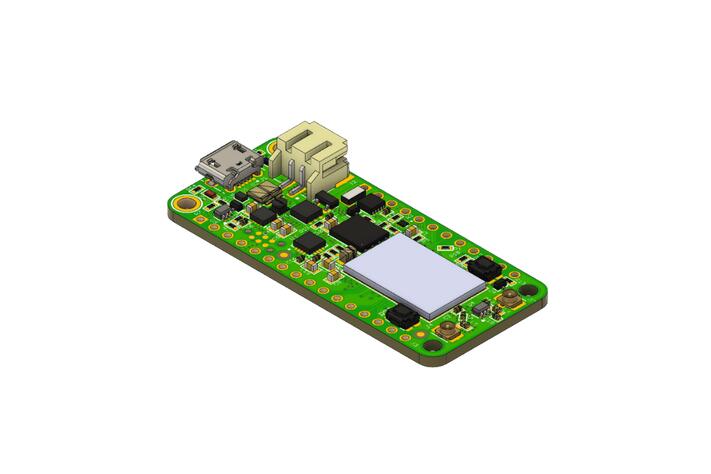
LTE-M · NB-IoT · nano SIM
USB/UART-enabled MCUBoot
TC2030 · J-Link · CMSIS-DAP
Part 2
접을 수 있는 영어 원문 전체
영어 원문 전체 펼치기
3DC3A181DA324959F7868E06A256BD7F66F221E6631637EDC3CF985267DF4C48
.. _circuitdojo_feather_nrf9160:

nRF9160 Feather
###############

.. figure:: ../../../../../../../boards/circuitdojo/feather/doc/img/circuitdojo_feather_nrf9160.jpg
     :align: center
     :alt: Circuit Dojo nRF9160 Feather

     nRF9160 Feather (Credit: Circuit Dojo)

Overview
********

The nRF9160 Feather by Circuit Dojo is a single-board development
for bringing your LTE-M and NB-IoT applications to life. The circuitdojo_feather_nrf9160
board configuration leverages the pre-existing support for the Nordic Semiconductor
nRF9160. Supported nRF9160 peripherals include:

* :abbr:`ADC (Analog to Digital Converter)`
* CLOCK
* FLASH
* :abbr:`GPIO (General Purpose Input Output)`
* :abbr:`I2C (Inter-Integrated Circuit)`
* :abbr:`MPU (Memory Protection Unit)`
* :abbr:`NVIC (Nested Vectored Interrupt Controller)`
* :abbr:`PWM (Pulse Width Modulation)`
* :abbr:`RTC (nRF RTC System Clock)`
* Segger RTT (RTT Console)
* :abbr:`SPI (Serial Peripheral Interface)`
* :abbr:`UARTE (Universal asynchronous receiver-transmitter with EasyDMA)`
* :abbr:`WDT (Watchdog Timer)`
* :abbr:`IDAU (Implementation Defined Attribution Unit)`

More information about the board can be found at the
`nRF9160 Feather Documentation`_.


Hardware
********

.. figure:: ../../../../../../../boards/circuitdojo/feather/doc/img/nrf9160-feather-v31-features.jpg
   :align: center
   :alt: nRF9160 Feather Features

Connections and IOs
===================

The nRF9160 Feather has everything you know and love about
the Feather platform. Here are some of the highlights:

LED
---

* D7 (blue) = P0.03

Push buttons and Switches
-------------------------

* MODE = P0.12
* RESET

USB
---

Contains a USB/UART connection for both debugging and loading new
code using a UART Enabled MCUBoot.

Standard Battery Connection
----------------------------

The nRF9160 Feather has a 2 pin battery connector on board. Lithium Polymer batteries >
300mA required.

Nano SIM Holder
---------------

The nRF9160 Feather has a built-in nano SIM (4FF) holder located
on the bottom side.


Programming and Debugging
*************************

circuitdojo_feather_nrf9160 has a Tag Connect TC2030-CTX-NL. It can be used
by most programmers like:

* J-Link (the nRF53-DK is recommended)
* CMSIS-DAP based programmers

Check out `Getting Started`_ for more info.

Building an application
=======================

In most cases you'll want to use the ``ns`` target with any of the Zephyr
or Nordic based examples.

.. note::
   Trusted Firmware-M (TF-M) and building the ``ns`` target is not supported for this board.

Some of the examples do not use secure mode, so they do not require the
``ns`` suffix. A great example of this is the `hello_world` below.

Flashing
========

Follow the instructions in the :ref:`nordic_segger` page to install
and configure all the necessary software. Further information can be
found in :ref:`nordic_segger_flashing`. Then build and flash
applications as usual (see :ref:`build_an_application` and
:ref:`application_run` for more details).

Here is an example for the :ref:`hello_world` application.

First, run your favorite terminal program to listen for output.

.. code-block:: console

   $ screen /dev/<tty_device> 115200

Replace :code:`<tty_device>` with the port where the nRF9160 Feather
can be found. In most cases (On Linux/Mac) it will be: :code:`/dev/tty.SLAB_USBtoUART`.

Then build and flash the application in the usual way.

.. zephyr-app-commands::
   :zephyr-app: samples/hello_world
   :board: circuitdojo_feather_nrf9160
   :goals: build flash

Debugging
=========

Refer to the :ref:`nordic_segger` page to learn about debugging Nordic boards with a
Segger IC.


Testing the LEDs and buttons on the nRF9160 Feather
***************************************************

There are 2 samples that allow you to test that the buttons (switches) and LEDs on
the board are working properly with Zephyr:

* :zephyr:code-sample:`blinky`
* :zephyr:code-sample:`button`

You can build and flash the examples to make sure Zephyr is running correctly on
your board. The button and LED definitions can be found in
:zephyr_file:`boards/circuitdojo/feather/circuitdojo_feather_nrf9160_common.dtsi`.

References
**********

.. target-notes::

**Side note** This page was based on the documentation for the nRF9160 DK. Thanks to Nordic for
developing a great platform!

.. _nRF9160 Feather Documentation: https://docs.jaredwolff.com/nrf9160-introduction.html
.. _Getting Started: https://docs.jaredwolff.com/nrf9160-getting-started.html
Part 3
한국어 전문 번역
nRF9160 Feather
개요
Circuit Dojo의 nRF9160 Feather는 LTE-M과 NB-IoT application을 실제로 구현하기 위한 single-board development platform입니다. circuitdojo_feather_nrf9160 board configuration은 Nordic Semiconductor nRF9160에 이미 마련된 지원을 활용합니다. 지원하는 nRF9160 peripheral은 다음과 같습니다.
- ADC(Analog to Digital Converter)
- CLOCK
- FLASH
- GPIO(General Purpose Input Output)
- I2C(Inter-Integrated Circuit)
- MPU(Memory Protection Unit)
- NVIC(Nested Vectored Interrupt Controller)
- PWM(Pulse Width Modulation)
- RTC(nRF RTC System Clock)
- SEGGER RTT(RTT Console)
- SPI(Serial Peripheral Interface)
- UARTE(Universal asynchronous receiver-transmitter with EasyDMA)
- WDT(Watchdog Timer)
- IDAU(Implementation Defined Attribution Unit)
보드에 대한 자세한 내용은 nRF9160 Feather Documentation에서 확인할 수 있습니다.
하드웨어
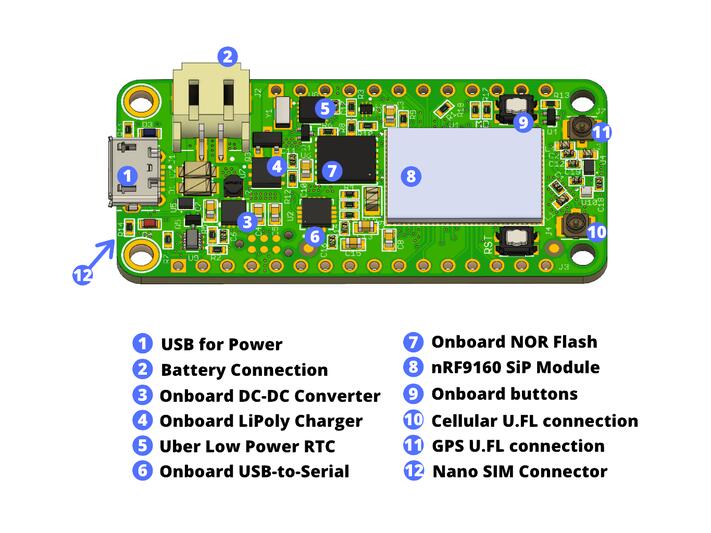
연결과 I/O
nRF9160 Feather는 Feather platform에서 익숙한 기능을 모두 갖췄습니다. 주요 항목은 다음과 같습니다.
LED
- D7(blue) = P0.03
Push button과 switch
- MODE = P0.12
- RESET
USB
debug와 UART-enabled MCUBoot를 통한 새 code loading에 모두 사용하는 USB/UART 연결을 포함합니다.
표준 battery 연결
nRF9160 Feather에는 2-pin battery connector가 있습니다. 300 mA를 초과해 공급할 수 있는 Lithium Polymer battery가 필요합니다.
Nano SIM holder
nRF9160 Feather의 바닥면에는 nano SIM(4FF) holder가 내장되어 있습니다.
프로그래밍과 디버깅
circuitdojo_feather_nrf9160에는 Tag-Connect TC2030-CTX-NL이 있습니다. 다음과 같은 대부분의 programmer에서 사용할 수 있습니다.
- J-Link(nRF53-DK 권장)
- CMSIS-DAP 기반 programmer
자세한 내용은 Getting Started를 참고하십시오.
Application build
대부분의 경우 Zephyr 또는 Nordic 기반 예제에 ns target을 사용하게 됩니다.
일부 예제는 secure mode를 사용하지 않으므로 ns suffix가 필요 없습니다. 아래 hello_world가 대표적인 예입니다.
Flashing
필요한 software를 설치하고 구성하려면 Zephyr의 Nordic SEGGER 안내를 따르십시오. Nordic SEGGER flashing 안내에서 추가 정보를 확인한 다음 일반적인 방법으로 application을 build하고 flash합니다.
다음은 hello_world application 예입니다. 먼저 원하는 terminal program을 실행해 출력을 기다립니다.
$ screen /dev/ 115200 <tty_device>를 nRF9160 Feather가 연결된 port로 바꿉니다. Linux/Mac에서는 대부분 /dev/tty.SLAB_USBtoUART입니다.
그 다음 일반적인 방법으로 application을 build하고 flash합니다.
west build -b circuitdojo_feather_nrf9160 samples/hello_world
west flash
Debugging
SEGGER IC로 Nordic board를 debug하는 방법은 Zephyr의 Nordic SEGGER 안내를 참고하십시오.
nRF9160 Feather의 LED와 button 시험
board의 button(switch)과 LED가 Zephyr에서 올바르게 동작하는지 시험할 수 있는 sample은 두 개입니다.
samples/basic/blinkysamples/basic/button
예제를 build하고 flash해 board에서 Zephyr가 올바르게 실행되는지 확인할 수 있습니다. button과 LED definition은 boards/circuitdojo/feather/circuitdojo_feather_nrf9160_common.dtsi에서 확인할 수 있습니다.
참고 자료
덧붙임: 이 페이지는 nRF9160 DK 문서를 바탕으로 작성됐습니다. 훌륭한 platform을 개발한 Nordic에 감사드립니다.
Source
출처
영어 원문에는 문단, 문서 지시문, 표, 코드, 코드 심벌, 경로를 그대로 보존했습니다.