Part 1
요약·해설
SAM D20 Xplained Pro는 flash 256 KiB, RAM 32 KiB와 EDBG를 제공합니다. SERCOM3이 EDBG console이고 SERCOM0 SPI와 SERCOM4 USART는 EXT1에 노출됩니다.
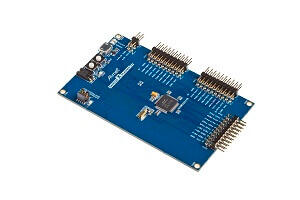
SAMD20J18 Cortex-M0+ · 48 MHz
SERCOM3 via EDBG
SERCOM0 SPI · SERCOM4 USART on EXT1
Part 2
접을 수 있는 영어 원문 전체
영어 원문 전체 펼치기
B6C69A76A88E0AA35F0AA710BBF7D2E7D4B95D2A02E23A2E67CE54860133A82B
.. _samd20_xpro:

SAM D20 Xplained Pro Evaluation Kit
###################################

Overview
********

The SAM D20 Xplained Pro evaluation kit is ideal for evaluation and
prototyping with the SAM D20 Cortex®-M0+ processor-based
microcontrollers. The kit includes Atmel’s Embedded Debugger (EDBG),
which provides a full debug interface without the need for additional
hardware.

.. figure:: ../../../../../../../../boards/atmel/sam0/samd20_xpro/doc/img/atsamd20_xpro.jpg
    :width: 500px
    :align: center
    :alt: SAMD20-XPRO

    SAMD20-XPRO (Credit: `Microchip Technology`_)

Hardware
********

- SAMD20J18 ARM Cortex-M0+ processor at 48 MHz
- 32.768 kHz crystal oscillator
- 256 KiB flash memory and 32 KiB of RAM
- One yellow user LED
- One mechanical user push button
- One reset button
- On-board USB based EDBG unit with serial console

Supported Features
==================

The samd20_xpro board configuration supports the following hardware
features:

.. list-table::
    :header-rows: 1

    * - Interface
      - Controller
      - Driver / Component
    * - NVIC
      - on-chip
      - nested vector interrupt controller
    * - Flash
      - on-chip
      - Can be used with LittleFS to store files
    * - SYSTICK
      - on-chip
      - systick
    * - WDT
      - on-chip
      - Watchdog
    * - ADC
      - on-chip
      - Analog to Digital Converter
    * - GPIO
      - on-chip
      - I/O ports
    * - USART
      - on-chip
      - Serial ports
    * - I2C
      - on-chip
      - I2C ports
    * - SPI
      - on-chip
      - Serial Peripheral Interface ports

Other hardware features are not currently supported by Zephyr.

The default configuration can be found in the Kconfig
:zephyr_file:`boards/atmel/sam0/samd20_xpro/samd20_xpro_defconfig`.

Connections and IOs
===================

The `Microchip website`_ has detailed information about board
connections. Download the `SAM D20 Xplained Pro Schematic`_ for more detail.

System Clock
============

The SAMD20 MCU is configured to use the 32.768 kHz external oscillator
with the on-chip PLL generating the 48 MHz system clock.

Serial Port
===========

The SAMD20 MCU has 6 SERCOM based USARTs. One of the USARTs
(SERCOM3) is connected to the onboard Atmel Embedded Debugger (EDBG).
SERCOM4 is available on the EXT1 connector.

SPI Port
========

The SAMD20 MCU has 6 SERCOM based SPIs. On the SAM D20 Xplained Pro,
SERCOM0 is available on the EXT1 connector.

Programming and Debugging
*************************

The SAM D20 Xplained Pro comes with a Atmel Embedded Debugger (EDBG).  This
provides a debug interface to the SAMD20 chip and is supported by
OpenOCD.

Flashing
========

#. Build the Zephyr kernel and the :ref:`hello_world` sample application:

   .. zephyr-app-commands::
      :zephyr-app: samples/hello_world
      :board: samd20_xpro
      :goals: build
      :compact:

#. Connect the SAM D20 Xplained Pro to your host computer using the USB debug
   port.

#. Run your favorite terminal program to listen for output. Under Linux the
   terminal should be :code:`/dev/ttyACM0`. For example:

   .. code-block:: console

      $ minicom -D /dev/ttyACM0 -o

   The -o option tells minicom not to send the modem initialization
   string. Connection should be configured as follows:

   - Speed: 115200
   - Data: 8 bits
   - Parity: None
   - Stop bits: 1

#. To flash an image:

   .. zephyr-app-commands::
      :zephyr-app: samples/hello_world
      :board: samd20_xpro
      :goals: flash
      :compact:

   You should see "Hello World! samd20_xpro" in your terminal.

References
**********

.. target-notes::

.. _Microchip Technology:
    https://www.microchip.com/DevelopmentTools/ProductDetails.aspx?PartNO=ATSAMD20-XPRO

.. _Microchip website:
    https://www.microchip.com/DevelopmentTools/ProductDetails.aspx?PartNO=ATSAMD20-XPRO

.. _SAM D20 Xplained Pro Schematic:
    http://ww1.microchip.com/downloads/en/DeviceDoc/SAMD20-Xplained-Pro_Design-Documentation.zip
Part 3
한국어 전문 번역
개요
SAM D20 Xplained Pro evaluation kit는 SAM D20 Cortex-M0+ microcontroller 평가와 prototyping용입니다. 추가 hardware 없이 full debug interface를 제공하는 EDBG를 포함합니다.
하드웨어
- 48 MHz SAMD20J18 Arm Cortex-M0+
- 32.768 kHz crystal
- flash 256 KiB, RAM 32 KiB
- yellow user LED, mechanical user button, reset button 각 1개
- serial console을 포함한 USB EDBG
지원 기능
| Interface | Controller | Driver/Component |
|---|---|---|
| NVIC | on-chip | nested vector interrupt controller |
| Flash | on-chip | LittleFS file storage |
| SYSTICK | on-chip | systick |
| WDT | on-chip | Watchdog |
| ADC | on-chip | Analog to Digital Converter |
| GPIO | on-chip | I/O ports |
| USART | on-chip | Serial ports |
| I2C | on-chip | I2C ports |
| SPI | on-chip | Serial Peripheral Interface ports |
다른 hardware는 현재 지원하지 않습니다. 기본 구성은 boards/atmel/sam0/samd20_xpro/samd20_xpro_defconfig입니다.
연결과 I/O
Microchip website와 SAM D20 Xplained Pro schematic에 board connection 세부 정보가 있습니다.
System clock
external 32.768 kHz oscillator와 on-chip PLL로 48 MHz system clock을 생성합니다.
Serial port
SERCOM 기반 USART는 6개입니다. SERCOM3은 on-board EDBG에 연결되고 SERCOM4는 EXT1 connector에 노출됩니다.
SPI port
SERCOM 기반 SPI는 6개이며 SERCOM0이 EXT1 connector에 노출됩니다.
프로그래밍과 디버깅
SAM D20 Xplained Pro에는 Atmel Embedded Debugger(EDBG)가 내장되어 있습니다. 추가 hardware 없이 SAMD20 debug interface를 제공하며 OpenOCD가 지원합니다.
Flashing
- Zephyr kernel과
hello_worldsample을 build합니다. - USB debug port로 보드를 host에 연결합니다.
- Linux에서는
/dev/ttyACM0terminal을 엽니다. - image를 flash합니다.
west build -b samd20_xpro samples/hello_world
minicom -D /dev/ttyACM0 -o
west flash
terminal은 115200 baud, 8 data bit, parity none, 1 stop bit로 설정합니다. -o는 modem initialization string을 보내지 않게 합니다. 출력으로 Hello World! samd20_xpro가 나타납니다.
참고 자료
Source
출처
영어 원문에는 문단, 문서 지시문, 표, 코드, 코드 심벌, 경로를 그대로 보존했습니다.