Part 1
요약·해설
AN547은 Cortex-M55와 Ethos-U55 NPU를 지원합니다. NPU는 QEMU에 없으므로 ML workload는 기본 Corstone-300 FVP를 사용해야 합니다.
Cortex-M55 / Ethos-U55
Corstone-300 FVP; QEMU without NPU
UART0 via Debug USB J8 port 1
Part 2
접을 수 있는 영어 원문 전체
영어 원문 전체 펼치기
AFC863D49E865D900EF5B4CA4084EE50BE03DCFDA58B3E09D31F03E68E2994A9
.. _mps3_an547_board:

ARM MPS3 AN547
###############

Overview
********

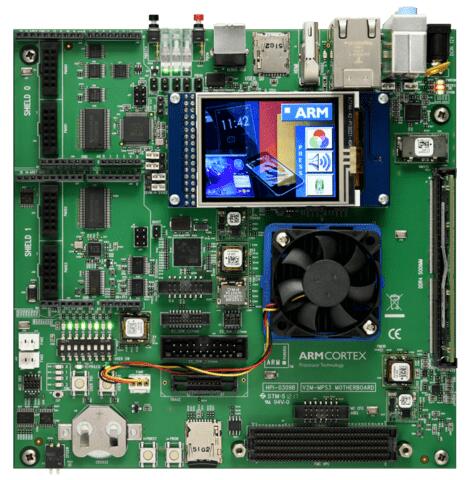
The mps3_an547 board configuration is used by Zephyr applications that run
on the MPS3 AN547 board. It provides support for the MPS3 AN547 ARM Cortex-M55
CPU and the following devices:

- Nested Vectored Interrupt Controller (NVIC)
- System Tick System Clock (SYSTICK)
- Cortex-M System Design Kit GPIO
- Cortex-M System Design Kit UART
- Ethos-U55 NPU

.. image:: ../../../../../../../boards/arm/mps3/doc/img/mps3_an547.jpg
     :align: center
     :alt: ARM MPS3 AN547

This board configuration also supports using the `Corstone-300 FVP`_ to emulate
a MPS3 AN547 hardware platform.

The Corstone-300 FVP (Fixed Virtual Platform) is a complete simulation of the
Arm system, including processor, memory and peripherals. It is a available free
of charge for Linux and Windows systems. The FVP has been selected for
simulation since it provides access to the Ethos-U55 NPU, which is unavailable
in QEMU or other simulation platforms.

To run the Fixed Virtual Platform simulation tool you must download "FVP model
for the Corstone-300 MPS3" from Arm and install it on your host PC. This board
has been tested with version 11.12.57 (Nov  2 2020).

Zephyr board options
====================

The MPS3+ AN547 is an SoC with Cortex-M55 architecture. Zephyr provides support
for building for both Secure and Non-Secure firmware.

The BOARD options are summarized below:

+----------------------+-----------------------------------------------+
|   BOARD              | Description                                   |
+======================+===============================================+
| ``mps3/an547``       | For building Secure (or Secure-only) firmware |
+----------------------+-----------------------------------------------+
| ``mps3/an547/ns``    | For building Non-Secure firmware              |
+----------------------+-----------------------------------------------+

Hardware
********

ARM MPS3 AN547 provides the following hardware components:

- ARM Cortex-M55
- Soft Macro Model (SMM) implementation of SSE-300 subsystem
- Memory

  - 8MB BRAM
  - 4GB DDR4 SODIMM (by default, upgradeable to 8GB)
  - 16GB eMMC
  - 8MB QSPI Flash

- Debug

  - P‐JTAG, F-JTAG, SWD, 4-bit trace, 16-bit trace
  - Four serial ports over USB

- Interface

  - AHB GPIO
  - UART
  - SPI
  - I2C
  - I2S
  - Color LCD serial interface
  - Ethernet
  - VGA

- On-board Peripherals

  - Color LCD
  - 10 LEDs
  - 8 Switches
  - 2 user push buttons

Supported Features
===================

The ``mps3/an547`` board configuration supports the following hardware features:

+-----------+------------+-------------------------------------+
| Interface | Controller | Driver/Component                    |
+===========+============+=====================================+
| NVIC      | on-chip    | nested vector interrupt controller  |
+-----------+------------+-------------------------------------+
| SYSTICK   | on-chip    | systick                             |
+-----------+------------+-------------------------------------+
| UART      | on-chip    | serial port-polling;                |
|           |            | serial port-interrupt               |
+-----------+------------+-------------------------------------+
| GPIO      | on-chip    | gpio                                |
+-----------+------------+-------------------------------------+

Other hardware features are not currently supported by the port.
See the `MPS3 FPGA Website`_ for a complete list of MPS3 AN547 board hardware
features.

The default configuration can be found in
:zephyr_file:`boards/arm/mps3/mps3_an547_defconfig`.

For more details refer to `MPS3 AN547 Technical Reference Manual (TRM)`_.

Serial Port
===========

The MPS3 AN547 has six UARTs. The Zephyr console output by default, uses
UART0, which is exposed over the Debug USB interface (J8).

Serial port 0 on the Debug USB interface is the MCC board control console.

Serial port 1 on the Debug USB interface is connected to UART 0.

Serial port 2 on the Debug USB interface is connected to UART 1.

Serial port 3 on the Debug USB interface is connected to UART 2.

Programming and Debugging
*************************

Flashing
========

MPS3 AN547 provides:

- A USB connection to the host computer, which exposes Mass Storage and
  CMSIS-DAP, and serial ports.

Building an application
-----------------------

You can build applications in the usual way. Here is an example for
the :ref:`hello_world` application.

.. zephyr-app-commands::
   :zephyr-app: samples/hello_world
   :board: mps3/an547
   :goals: build

Open a serial terminal (minicom, putty, etc.) with the following settings:

- Speed: 115200
- Data: 8 bits
- Parity: None
- Stop bits: 1

Reset the board, and you should see the following message on the corresponding
serial port:

.. code-block:: console

   Hello World! mps3

Uploading an application to MPS3 AN547
---------------------------------------

Applications can be in elf, hex or bin format. The binaries are flashed when
the board boots up, using files stored on the on-board Micro SD card. The
Motherboard Configuration Controller (MCC) is responsible for loading the FPGA
image and binaries.

Connect the MPS3 to your host computer using the USB port. You should see a
USB connection exposing a Mass Storage (``V2M-MPS3`` by default).

The update requires 3 steps:

1. Copy application files to ``<MPS3 device name>/SOFTWARE/``.
2. Open ``<MPS3 device name>/MB/HBI0309C/AN547/images.txt``.
3. Update the ``AN547/images.txt`` file as follows:

.. code-block:: bash

   TITLE: Versatile Express Images Configuration File

   [IMAGES]
   TOTALIMAGES: 1 ;Number of Images (Max: 32)

   IMAGE0ADDRESS: 0x01000000 ;Please select the required executable program

   IMAGE0FILE: \SOFTWARE\zephyr.elf


Reset the board, and you should see the following message on the corresponding
serial port:

.. code-block:: console

   Hello World! mps3


FVP Usage
=========

To run with the FVP, first set environment variable ``ARMFVP_BIN_PATH`` before
using it. Then you can run it with ``west build -t run``.

.. code-block:: bash

   export ARMFVP_BIN_PATH=/path/to/fvp/directory
   west build -t run


QEMU Usage
==========

To run with QEMU instead of the default FVP, override the emulator selection
at build time via:

.. code-block:: bash

   $ west build -b mps3_an547 samples/hello_world -DEMU_PLATFORM=qemu -t run


Note, however, that the Ethos-U55 NPU is not available in QEMU. If you require
the use of the NPU, please use the default FVP for device emulation.

.. _Corstone-300 FVP:
   https://developer.arm.com/tools-and-software/open-source-software/arm-platforms-software/arm-ecosystem-fvps

.. _MPS3 FPGA Website:
   https://developer.arm.com/tools-and-software/development-boards/fpga-prototyping-boards/mps3

.. _MPS3 AN547 Technical Reference Manual (TRM):
   https://developer.arm.com/-/media/Arm%20Developer%20Community/PDF/DAI0547B_SSE300_PLUS_U55_FPGA_for_mps3.pdf

.. _MPS3 FPGA Prototyping Board Technical Reference Manual (TRM):
   https://developer.arm.com/documentation/100765/latest

.. _Cortex M55 Generic User Guide:
   https://developer.arm.com/documentation/101051/latest

.. _Corelink SSE-300 Example Subsystem:
   https://developer.arm.com/documentation/101772/latest
Part 3
한국어 전문 번역
개요
mps3/an547은 MPS3 AN547의 Arm Cortex-M55, NVIC, SYSTICK, CMSDK GPIO·UART, Ethos-U55 NPU를 지원합니다.
Corstone-300 FVP로 AN547 hardware를 emulation할 수도 있습니다. FVP는 processor, memory, peripheral을 포함한 전체 Arm system simulation입니다. Linux와 Windows에 무료로 제공되며, QEMU 등 다른 simulation platform에 없는 Ethos-U55 NPU를 제공하기 때문에 선택되었습니다. Arm에서 FVP model for the Corstone-300 MPS3를 내려받아 host에 설치해야 합니다. 이 문서는 version 11.12.57 (Nov 2 2020)로 시험했습니다.
Zephyr board option
MPS3+ AN547은 Cortex-M55 architecture SoC이며 Secure와 Non-Secure firmware를 모두 build할 수 있습니다.
| BOARD | 설명 |
|---|---|
mps3/an547 | Secure 또는 Secure-only firmware |
mps3/an547/ns | Non-Secure firmware |
하드웨어
- Arm Cortex-M55와 SSE-300 subsystem의 Soft Macro Model(SMM)
- memory: BRAM 8 MB, DDR4 SODIMM 4 GB(기본, 8 GB로 확장 가능), eMMC 16 GB, QSPI flash 8 MB
- debug: P-JTAG, F-JTAG, SWD, 4-bit/16-bit trace, USB serial port 4개
- interface: AHB GPIO, UART, SPI, I2C, I2S, color LCD serial, Ethernet, VGA
- on-board: color LCD, LED 10개, switch 8개, user push button 2개
지원 기능
| Interface | Controller | Driver/Component |
|---|---|---|
| NVIC | on-chip | nested vector interrupt controller |
| SYSTICK | on-chip | systick |
| UART | on-chip | serial port-polling; serial port-interrupt |
| GPIO | on-chip | gpio |
다른 hardware는 현재 port에서 지원하지 않습니다. 기본 구성은 boards/arm/mps3/mps3_an547_defconfig입니다.
Serial port
UART는 6개입니다. 기본 Zephyr console은 Debug USB interface J8에 노출된 UART0입니다. Debug USB serial port 0은 MCC board control console, port 1은 UART0, port 2는 UART1, port 3은 UART2에 연결됩니다.
프로그래밍과 디버깅
USB는 Mass Storage, CMSIS-DAP, serial port를 노출합니다.
Application build
west build -b mps3/an547 samples/hello_worldterminal을 115200 baud, 8 data bit, parity none, 1 stop bit로 열고 reset하면 다음 출력을 볼 수 있습니다.
Hello World! mps3Application upload
ELF, HEX, BIN을 사용할 수 있습니다. boot 때 on-board Micro SD의 파일을 MCC가 FPGA image와 binary로 load합니다. USB 연결 시 기본 V2M-MPS3 Mass Storage가 나타납니다.
- application을
<MPS3 device name>/SOFTWARE/에 복사합니다. <MPS3 device name>/MB/HBI0309C/AN547/images.txt를 엽니다.- 다음 내용으로 갱신합니다.
TITLE: Versatile Express Images Configuration File

[IMAGES]
TOTALIMAGES: 1 ;Number of Images (Max: 32)

IMAGE0ADDRESS: 0x01000000 ;Please select the required executable program

IMAGE0FILE: \SOFTWARE\zephyr.elf
reset 후 Hello World! mps3을 확인합니다.
FVP 사용
먼저 ARMFVP_BIN_PATH를 설정하고 run target을 실행합니다.
export ARMFVP_BIN_PATH=/path/to/fvp/directory
west build -t run
QEMU 사용
기본 FVP 대신 QEMU를 쓰려면 build 시 emulator를 override합니다.
west build -b mps3_an547 samples/hello_world -DEMU_PLATFORM=qemu -t runQEMU에는 Ethos-U55 NPU가 없습니다. NPU가 필요하면 기본 FVP를 사용합니다.
참고 자료
Source
출처
영어 원문에는 문단, 문서 지시문, 표, 코드, 코드 심벌, 경로를 그대로 보존했습니다.