Part 1
요약·해설
Portenta H7은 480 MHz STM32H747XI Cortex-M7 + M4, flash 2 MB, RAM 1 MB, DSP·Art Accelerator·L1 cache와 external memory interface를 제공합니다.
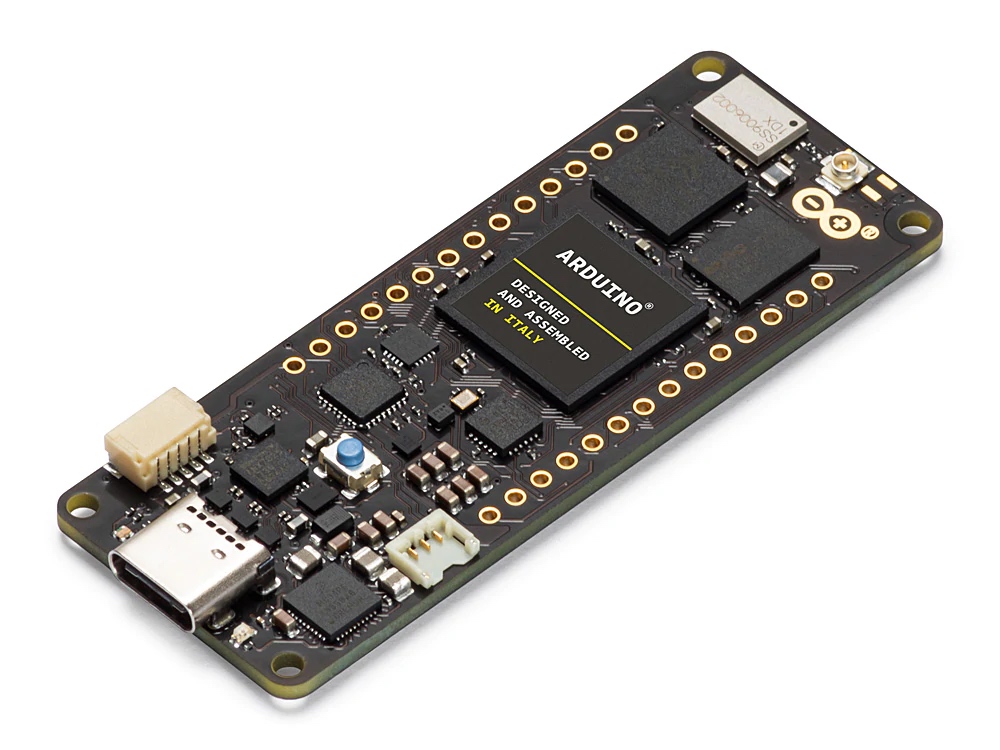
480 MHz STM32H747XI M7 + M4
USB HS, Ethernet, QSPI, SDRAM, SPI
stm32h747xx/m7 또는 stm32h747xx/m4
Part 2
접을 수 있는 영어 원문 전체
영어 원문 전체 펼치기
0C4C976251D4FFD5342BD92368D9581BBBBE7EB6225CC437EF830E8BC1F8A823
.. _arduino_portenta_h7_board:

Arduino Portenta H7
###################

Overview
********

The Portenta H7 enables a wide diversity of applications taking benefit
from Computer Vision, PLCs, Robotics controller, High-end industrial machinery
and high-speed booting computation (ms).

The board includes an STM32H747XI SoC with a high-performance DSP, Arm Cortex-M7 + Cortex-M4 MCU,
with 2MBytes of Flash memory, 1MB RAM, 480 MHz CPU, Art Accelerator, L1 cache, external memory interface,
large set of peripherals, SMPS, and MIPI-DSI.

Additionally, the board features:

- USB OTG FS
- 3 color user LEDs

.. image:: ../../../../../../../boards/arduino/portenta_h7/doc/img/arduino_portenta_h7.jpeg
     :width: 500px
     :align: center
     :height: 325px
     :alt: ARDUINO_PORTENTA_H7

More information about the board can be found at the `ARDUINO_PORTENTA_H7 website`_.
More information about STM32H747XIH6 can be found here:

- `STM32H747XI on www.st.com`_
- `STM32H747xx reference manual`_
- `STM32H747xx datasheet`_

Supported Features
==================

The current Zephyr arduino_portenta_h7 board configuration supports the following hardware features:

+-----------+------------+-------------------------------------+
| Interface | Controller | Driver/Component                    |
+===========+============+=====================================+
| NVIC      | on-chip    | nested vector interrupt controller  |
+-----------+------------+-------------------------------------+
| UART      | on-chip    | serial port-polling;                |
|           |            | serial port-interrupt               |
+-----------+------------+-------------------------------------+
| PINMUX    | on-chip    | pinmux                              |
+-----------+------------+-------------------------------------+
| GPIO      | on-chip    | gpio                                |
+-----------+------------+-------------------------------------+
| FLASH     | on-chip    | flash memory                        |
+-----------+------------+-------------------------------------+
| RNG       | on-chip    | True Random number generator        |
+-----------+------------+-------------------------------------+
| SPI       | on-chip    | spi                                 |
+-----------+------------+-------------------------------------+
| IPM       | on-chip    | virtual mailbox based on HSEM       |
+-----------+------------+-------------------------------------+
| EXTFLASH  | on-chip    | qspi                                |
+-----------+------------+-------------------------------------+
| SDRAM     | on-chip    | sdram                               |
+-----------+------------+-------------------------------------+
| USB       | on-board   | usb-hs                              |
+-----------+------------+-------------------------------------+
| ETHERNET  | on-board   | eth                                 |
+-----------+------------+-------------------------------------+

Other hardware features are not yet supported on Zephyr porting.

The high precision low speed external (LSE) clock is only fully supported on
boards with hardware revision 4.10 or greater. By default the internal source
is used; to enable the use of the external oscillator, manually specify the
hardware revision at build time (see :ref:`application_board_version` for
information on how to build for specific revisions of the board).

Resources sharing
=================

The dual core nature of STM32H747 SoC requires sharing HW resources between the
two cores. This is done in 3 ways:

- **Compilation**: Clock configuration is only accessible to M7 core. M4 core only
  has access to bus clock activation and deactivation.
- **Static pre-compilation assignment**: Peripherals such as a UART are assigned in
  devicetree before compilation. The user must ensure peripherals are not assigned
  to both cores at the same time.
- **Run time protection**: Interrupt-controller and GPIO configurations could be
  accessed by both cores at run time. Accesses are protected by a hardware semaphore
  to avoid potential concurrent access issues.

Building and Flashing
*************************

Applications for the ``arduino_portenta_h7`` board should be built per core target,
using either ``arduino_portenta_h7_m7`` or ``arduino_portenta_h7_m4`` as the target.
See :ref:`build_an_application` for more information about application builds.


Flashing
========

Installing dfu-util
-------------------

This board requires dfu-utils for flashing. It is recommended to use at least
v0.8 of `dfu-util`_. The package available in debian/ubuntu can be quite old, so you might
have to build dfu-util from source.

Flashing an application to STM32H747I M7 Core
---------------------------------------------

First, connect the Arduino Portenta H7 board to your host computer using
the USB port to prepare it for flashing. Double tap the button to put the board
into the Arduino Bootloader mode. Then build and flash your application.

Here is an example for the :ref:`hello_world` application.

.. zephyr-app-commands::
   :zephyr-app: samples/hello_world
   :board: arduino_portenta_h7/stm32h747xx/m7
   :goals: build flash

Run a serial host program to connect with your board:

.. code-block:: console

   $ minicom -D /dev/ttyACM0

You should see the following message on the console:

.. code-block:: console

   Hello World! arduino_portenta_h7

Similarly, you can build and flash samples on the M4 target. For this, please
take care of the resource sharing (UART port used for console for instance).

Here is an example for the :zephyr:code-sample:`blinky` application on M4 core.

.. zephyr-app-commands::
   :zephyr-app: samples/basic/blinky
   :board: arduino_portenta_h7/stm32h747xx/m4
   :goals: build flash

.. _ARDUINO_PORTENTA_H7 website:
   https://docs.arduino.cc/hardware/portenta-h7

.. _STM32H747XI on www.st.com:
   https://www.st.com/content/st_com/en/products/microcontrollers-microprocessors/stm32-32-bit-arm-cortex-mcus/stm32-high-performance-mcus/stm32h7-series/stm32h747-757/stm32h747xi.html

.. _STM32H747xx reference manual:
   https://www.st.com/resource/en/reference_manual/dm00176879.pdf

.. _STM32H747xx datasheet:
   https://www.st.com/resource/en/datasheet/stm32h747xi.pdf

.. _dfu-util:
   http://dfu-util.sourceforge.net/build.html
Part 3
한국어 전문 번역
개요
Portenta H7은 computer vision, PLC, robotics controller, high-end industrial machinery와 millisecond high-speed boot computation에 사용합니다. STM32H747XI는 DSP, Cortex-M7 + M4, flash 2 MB, RAM 1 MB, 480 MHz CPU, Art Accelerator, L1 cache, external memory interface, SMPS와 MIPI-DSI를 포함합니다. board에는 USB OTG FS와 3-color user LED도 있습니다.
지원 기능
| Interface | Controller | Driver/Component |
|---|---|---|
| NVIC | on-chip | nested vector interrupt controller |
| UART | on-chip | serial polling·interrupt |
| PINMUX | on-chip | pinmux |
| GPIO | on-chip | gpio |
| FLASH | on-chip | flash memory |
| RNG | on-chip | TRNG |
| SPI | on-chip | spi |
| IPM | on-chip | HSEM virtual mailbox |
| EXTFLASH | on-chip | qspi |
| SDRAM | on-chip | sdram |
| USB | on-board | usb-hs |
| ETHERNET | on-board | eth |
다른 기능은 아직 지원하지 않습니다. high-precision low-speed external LSE는 revision 4.10 이상만 완전히 지원하며 기본은 internal source입니다. external oscillator를 쓰려면 build에서 hardware revision을 지정합니다.
Dual-core 자원 공유
STM32H747의 두 core는 다음 세 방식으로 hardware resource를 공유합니다.
- Compile: clock configuration은 M7만 접근하고 M4는 bus clock 활성·비활성만 제어합니다.
- Static pre-compilation assignment: UART 같은 peripheral은 devicetree에서 미리 core에 할당하며 두 core에 동시에 배정하면 안 됩니다.
- Run-time protection: 두 core가 접근할 수 있는 interrupt controller와 GPIO configuration은 hardware semaphore로 동시 접근을 막습니다.
Build와 flash
M7은 arduino_portenta_h7/stm32h747xx/m7, M4는 arduino_portenta_h7/stm32h747xx/m4 target을 사용합니다. flash에는 dfu-util 0.8 이상을 권장하며 Debian/Ubuntu package가 오래되었다면 source build가 필요할 수 있습니다.
M7 hello_world
USB를 연결하고 button을 double-tap해 Arduino bootloader mode로 진입합니다.
west build -b arduino_portenta_h7/stm32h747xx/m7 samples/hello_world
west flash
$ minicom -D /dev/ttyACM0
Hello World! arduino_portenta_h7
M4 blinky
M4에서 build할 때 console UART를 포함한 shared resource 충돌에 주의합니다.
west build -b arduino_portenta_h7/stm32h747xx/m4 samples/basic/blinky
west flash
참고 자료
Source
출처
영어 원문에는 문단, 문서 지시문, 표, 코드, 코드 심벌, 경로를 그대로 보존했습니다.