Part 1
요약·해설
EVAL-ADIN1110EBZ는 견고하고 저전력인 ADIN1110 10BASE-T1L MAC-PHY를 빠르게 평가하는 유연한 platform입니다. cable 최대 1.7 km에서 device와 10 Mbit/s Single Pair Ethernet(SPE) 연결을 제공합니다.
두 operation mode를 제공합니다. USB로 PC에 연결하면 serial command interface로 ADIN1110 register 전체, link quality monitoring과 diagnostics에 접근할 수 있고 Arduino interface도 제공합니다.
대신 hardware configuration link와 switch를 설정해 stand-alone mode로 동작시킬 수 있으며 on-board LED가 상태를 표시합니다. SPI interface는 ADIN1110 설정과 data access를 제공합니다. 작은 prototyping area와 test point는 isolation transformer 또는 power-coupling inductor를 포함한 다른 cable topology를 시험하는 데 사용합니다.
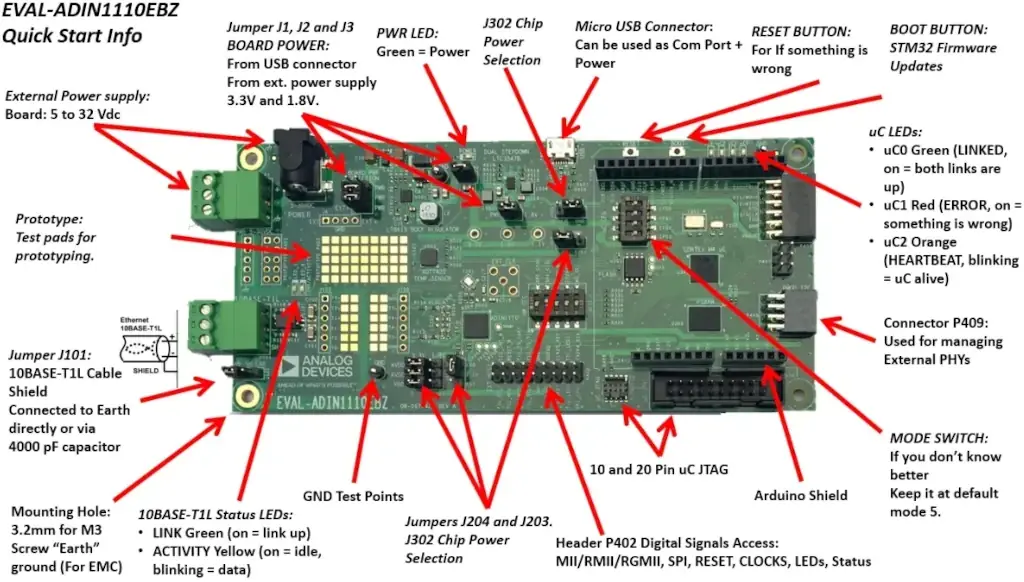
10 Mbit/s 10BASE-T1L, 최대 1.7 km
STM32L4 계열 MCU, SPI와 FT232 USB-UART
on-board ST-LINK/V2-1 JTAG/SWD, OpenOCD
Part 2
접을 수 있는 영어 원문 전체
영어 원문 전체 펼치기
66E090F128118069D5D90C048CA3A4119BC75FEFCC28D89A656EC35D94D1C2D4
.. _adi_eval_adin1110ebz:

ADI EVAL-ADIN1110EVB Evaluation board
#####################################

Overview
********

The EVAL-ADIN1110EBZ is a flexible platform enabling quick evaluation of the ADIN1110, robust,
low power 10BASE-T1L MAC-PHY. It provides 10Mbit per second Single Pair Ethernet (SPE) connections
with devices across 1.7km of cable.

The evaluation board offers two modes of operation for maximum flexibility. Connected to a PC
via USB port, the full set of ADIN1110 register settings and features such as link quality
monitoring and diagnostics can be accessed over the USB using serial command interface.
The board also provides an Arduino interface.

Alternatively, the board can operate in stand-alone mode where it is configured by setting hardware
configuration links and switches. On-board LEDs provide status indication.

The SPI interface provides configuration and data access to the ADIN1110.

A small prototyping area and test points are provided for experimentation with alternative cable
connection topologies including isolation transformers and/or power coupling inductors.

.. figure:: ../../../../../../../boards/adi/eval_adin1110ebz/doc/img/adi_eval_adin1110ebz.webp
   :align: center
   :alt: ADI EVAL-ADIN1110EBZ

   ADI EVAL-ADIN1110EBZ (Credit: Analog Devices, Inc.)

.. important::

   S201 DIP switches are shipped in Open Alliance SPI mode. The current Zephyr
   default board configuration is set to work as "Generic SPI, CRC enabled",
   so the S201 DIP switches must be set as ``SPI_CFG0 OFF`` and ``SPI_CFG1 ON``.
   An inconsistent S201 DIP switches configuration will halt the boot.

Hardware
********

The ADI EVAL-ADIN1110EBZ hardware features list is available here:

https://wiki.analog.com/resources/eval/user-guides/eval-adin1110ebz-user-guide


Supported Features
==================

The ADI adi_eval_adin1110ebz board configuration supports the
following hardware features:

+--------------+------------+-------------------------------------+
| Interface    | Controller | Driver/Component                    |
+==============+============+=====================================+
| NVIC         | on-chip    | nested vector interrupt controller  |
+--------------+------------+-------------------------------------+
| UART         | on-chip    | serial port-polling;                |
|              |            | serial port-interrupt               |
+--------------+------------+-------------------------------------+
| PINMUX       | on-chip    | pinmux                              |
+--------------+------------+-------------------------------------+
| GPIO         | on-chip    | gpio                                |
+--------------+------------+-------------------------------------+
| I2C          | on-chip    | i2c                                 |
+--------------+------------+-------------------------------------+
| SPI          | on-chip    | spi                                 |
+--------------+------------+-------------------------------------+
| PWM          | on-chip    | pwm                                 |
+--------------+------------+-------------------------------------+
| WATCHDOG     | on-chip    | independent watchdog                |
+--------------+------------+-------------------------------------+
| ADIN1110     | spi        | adin1110 10BASE-T1L mac/phy         |
+--------------+------------+-------------------------------------+
| FT232        | uart       | usb-uart                            |
+--------------+------------+-------------------------------------+
| ADT7422      | i2c        | temperature sensor                  |
+--------------+------------+-------------------------------------+
| ISS66WVE4M16 | fmc        | 8MB PSRAM                           |
+--------------+------------+-------------------------------------+


The default configuration can be found in the defconfig file:

	:zephyr_file:`boards/adi/eval_adin1110ebz/adi_eval_adin1110ebz_defconfig`


Connections and IOs
===================

ADI ADIN1110EBZ evaluation board has 7 GPIO controllers (from A to G). These controllers are
responsible for pin muxing, input/output, pull-up, etc.

For mode details please refer to `EVAL-ADIN1110EBZ User Guide <https://wiki.analog.com/resources/eval/user-guides/eval-adin1110ebz-user-guide>`_.

Default Zephyr Peripheral Mapping:
----------------------------------

- UART_1 TX/RX : PA9/PA10 (UART to FT232)
- UART_4 TX/RX : PA0/PA1 (Arduino Serial)
- I2C1 SCL/SDA : PG14/PG13 (Arduino I2C)
- I2C3 SCL/SDA : PG7/PG8 (Sensor I2C bus)
- SPI1 SCK/MISO/MOSI : PA5/PA6/PA7 (Simple SPI to nor Flash)
- SPI2 SCK/MISO/MOSI : PB13/PB14/PB15 (ADIN1110)
- SPI3 SCK/MISO/MOSI : PC10/PC11/PC12 (Arduino SPI)
- LD1 : PC13 (Green LED)
- LD2 : PE2 (Red LED)
- LD3 : PE6 (Yellow LED)
- LD4 : PG15 (Blue LED)
- PSRAM : PE0/PE1/PF0-PF15/PG0-PG5/PD11-PD13/PE3/PE4
          PD14/PD15/PD9/PD1/PE7-PE15/PD8-PD10


System Clock
------------

EVAL-ADIN1110EBZ System Clock could be driven by an internal or external oscillator, as well as
the main PLL clock. By default the System clock is driven by the PLL clock at 80MHz, driven by the
16MHz high speed internal oscillator.

Serial Port
-----------

EVAL-ADIN1110EBZ has 2 U(S)ARTs. The Zephyr console output is assigned to UART1 that is connected
to a FT232, so available through Micro USB connector. Default settings are 115200 8N1.


Programming and Debugging
*************************

Flashing
========

EVAL-ADIN1110EBZ includes an ST-LINK/V2-1 JTAG/SWD 10 or 20 pin connector. This interface is
supported by the openocd version included in Zephyr SDK.

Flashing an application to  Discovery kit
-----------------------------------------

Connect the EVAL-ADIN1110EBZ to your host computer using the USB port, then run a serial host
program to connect with your ADI board. For example:

.. code-block:: console

   $ minicom -D /dev/serial/by-id/usb-ADI_EVAL-ADIN1110EBZ_AVAS_XXXXXX-if00-port0

where XXXXXX is the serial number of the connected device.
Then, build and flash in the usual way. Here is an example for the :ref:`hello_world` application.

.. zephyr-app-commands::
   :zephyr-app: samples/hello_world
   :board: adi_eval_adin1110ebz
   :goals: build flash

You should see the following message on the console:

.. code-block:: console

   Hello World! adi_eval_adin1110ebz

Debugging
=========

You can debug an application in the usual way.  Here is an example for the :ref:`hello_world`
application.

.. zephyr-app-commands::
   :zephyr-app: samples/hello_world
   :board: adi_eval_adin1110ebz
   :maybe-skip-config:
   :goals: debug

.. _EVAL-ADIN1110EBZ evaluation board website:
   https://www.analog.com/en/design-center/evaluation-hardware-and-software/evaluation-boards-kits/eval-adin1110.html

.. _EVAL-ADIN1110EBZ board User Guide:
   https://wiki.analog.com/resources/eval/user-guides/eval-adin1110ebz-user-guide

.. _ADIN1110 Datasheet:
   https://www.analog.com/media/en/technical-documentation/data-sheets/adin1110.pdf

.. _STM32L4S5QII3P reference manual:
   https://www.st.com/resource/en/reference_manual/rm0432-stm32l4-series-advanced-armbased-32bit-mcus-stmicroelectronics.pdf
Part 3
한국어 전문 번역
개요
EVAL-ADIN1110EBZ는 견고하고 저전력인 ADIN1110 10BASE-T1L MAC-PHY를 빠르게 평가하는 유연한 platform입니다. cable 최대 1.7 km에서 device와 10 Mbit/s Single Pair Ethernet(SPE) 연결을 제공합니다.
두 operation mode를 제공합니다. USB로 PC에 연결하면 serial command interface로 ADIN1110 register 전체, link quality monitoring과 diagnostics에 접근할 수 있고 Arduino interface도 제공합니다.
대신 hardware configuration link와 switch를 설정해 stand-alone mode로 동작시킬 수 있으며 on-board LED가 상태를 표시합니다. SPI interface는 ADIN1110 설정과 data access를 제공합니다. 작은 prototyping area와 test point는 isolation transformer 또는 power-coupling inductor를 포함한 다른 cable topology를 시험하는 데 사용합니다.
하드웨어
hardware 기능 목록은 EVAL-ADIN1110EBZ user guide에서 확인할 수 있습니다.
지원 기능
ADI adi_eval_adin1110ebz board configuration은 다음 hardware 기능을 지원합니다.
| Interface | Controller | Driver/Component |
|---|---|---|
| NVIC | on-chip | nested vector interrupt controller |
| UART | on-chip | serial port polling·interrupt |
| PINMUX | on-chip | pinmux |
| GPIO | on-chip | gpio |
| I2C | on-chip | i2c |
| SPI | on-chip | spi |
| PWM | on-chip | pwm |
| WATCHDOG | on-chip | independent watchdog |
| ADIN1110 | spi | adin1110 10BASE-T1L mac/phy |
| FT232 | uart | usb-uart |
| ADT7422 | i2c | temperature sensor |
| ISS66WVE4M16 | fmc | 8 MB PSRAM |
기본 설정은 boards/adi/eval_adin1110ebz/adi_eval_adin1110ebz_defconfig에서 확인할 수 있습니다.
연결과 I/O
EVAL-ADIN1110EBZ에는 A~G의 GPIO controller 7개가 있으며 pin muxing, input/output, pull-up 등을 담당합니다. mode의 자세한 내용은 board user guide를 참고합니다.
Zephyr 기본 peripheral mapping
| Peripheral | Pins | Purpose |
|---|---|---|
| UART_1 TX/RX | PA9/PA10 | UART to FT232 |
| UART_4 TX/RX | PA0/PA1 | Arduino Serial |
| I2C1 SCL/SDA | PG14/PG13 | Arduino I2C |
| I2C3 SCL/SDA | PG7/PG8 | Sensor I2C bus |
| SPI1 SCK/MISO/MOSI | PA5/PA6/PA7 | simple SPI to NOR flash |
| SPI2 SCK/MISO/MOSI | PB13/PB14/PB15 | ADIN1110 |
| SPI3 SCK/MISO/MOSI | PC10/PC11/PC12 | Arduino SPI |
| LD1 | PC13 | Green LED |
| LD2 | PE2 | Red LED |
| LD3 | PE6 | Yellow LED |
| LD4 | PG15 | Blue LED |
| PSRAM | PE0/PE1/PF0-PF15/PG0-PG5/PD11-PD15/PD1/PD8-PD10/PE3-PE15 | external PSRAM bus |
System clock
system clock은 internal/external oscillator 또는 main PLL로 구동할 수 있습니다. 기본값은 16 MHz high-speed internal oscillator가 구동하는 PLL의 80 MHz clock입니다.
Serial port
EVAL-ADIN1110EBZ에는 U(S)ART 2개가 있습니다. Zephyr console은 FT232에 연결된 UART1이며 Micro USB에서 사용할 수 있습니다. 기본 설정은 115200 8N1입니다.
프로그래밍과 디버깅
EVAL-ADIN1110EBZ에는 ST-LINK/V2-1 JTAG/SWD 10-pin 또는 20-pin connector가 있습니다. Zephyr SDK에 포함된 OpenOCD가 이 interface를 지원합니다.
Discovery kit에 application flash
USB로 board를 host에 연결한 뒤 serial host program을 실행합니다. XXXXXX는 연결된 device의 serial number입니다.
$ minicom -D /dev/serial/by-id/usb-ADI_EVAL-ADIN1110EBZ_AVAS_XXXXXX-if00-port0hello_world를 build하고 flash합니다.
west build -b adi_eval_adin1110ebz samples/hello_world
west flash
console에 Hello World! adi_eval_adin1110ebz가 표시돼야 합니다.
Debugging
일반적인 방법으로 application을 debug할 수 있습니다.
west debug참고 자료
Source
출처
영어 원문에는 문단, 문서 지시문, 표, 코드, 코드 심벌, 경로를 그대로 보존했습니다.