Part 1
요약·해설
Trinket M0는 27 × 15 mm 크기의 Cortex-M0+ board로, 외부 I/O는 5개 pin뿐이지만 UART, SPI, PWM과 native USB를 지원하고 DotStar RGB LED를 내장합니다.
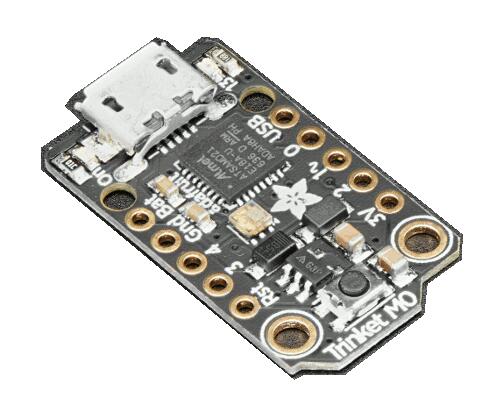
48 MHz ATSAMD21E18A Cortex-M0+
외부 pin 5개, SERCOM UART·SPI와 PWM
reset 두 번 또는 USB CDC ACM을 통한 UF2 bootloader
Part 2
접을 수 있는 영어 원문 전체
영어 원문 전체 펼치기
64FB93B1C8928CCAF19B457BFA78AFD7D94AD06EAC816ED6CFAEFAC2EF217227
.. _adafruit_trinket_m0:

Adafruit Trinket M0
###################

Overview
********

The Adafruit Trinket M0 is a tiny (27 mm x 15 mm) ARM development
board with an onboard RGB LED, USB port, and range of I/O broken out
onto 5 pins.

.. image:: ../../../../../../../boards/adafruit/trinket_m0/doc/img/adafruit_trinket_m0.jpg
     :align: center
     :alt: Adafruit Trinket M0

Hardware
********

- ATSAMD21E18A ARM Cortex-M0+ processor at 48 MHz
- 256 KiB flash memory and 32 KiB of RAM
- Internal trimmed 8 MHz oscillator
- A user LED
- An RGB DotStar LED
- Native USB port
- One reset button

Supported Features
==================

The adafruit_trinket_m0 board configuration supports the following hardware
features:

+-----------+------------+------------------------------------------+
| Interface | Controller | Driver/Component                         |
+===========+============+==========================================+
| NVIC      | on-chip    | nested vector interrupt controller       |
+-----------+------------+------------------------------------------+
| Flash     | on-chip    | Can be used with LittleFS to store files |
+-----------+------------+------------------------------------------+
| SYSTICK   | on-chip    | systick                                  |
+-----------+------------+------------------------------------------+
| WDT       | on-chip    | Watchdog                                 |
+-----------+------------+------------------------------------------+
| GPIO      | on-chip    | I/O ports                                |
+-----------+------------+------------------------------------------+
| PWM       | on-chip    | Pulse Width Modulation                   |
+-----------+------------+------------------------------------------+
| USART     | on-chip    | Serial ports                             |
+-----------+------------+------------------------------------------+
| SPI       | on-chip    | Serial Peripheral Interface ports        |
+-----------+------------+------------------------------------------+
| USB       | on-chip    | USB device                               |
+-----------+------------+------------------------------------------+

Other hardware features are not currently supported by Zephyr.

The default configuration can be found in the Kconfig file
:zephyr_file:`boards/adafruit/trinket_m0/adafruit_trinket_m0_defconfig`.

Connections and IOs
===================

The `Adafruit Trinket M0 Learn site`_ has detailed information about
the board including `pinouts`_ and the `schematic`_.

System Clock
============

The SAMD21 MCU is configured to use the 8 MHz internal oscillator
with the on-chip PLL generating the 48 MHz system clock.  The internal
APB and GCLK unit are set up in the same way as the upstream Arduino
libraries.

Serial Port
===========

The SAMD21 MCU has 6 SERCOM based USARTs.  On the Trinket, SERCOM0 is
the Zephyr console and is available on pins 3 (RX) and 4 (TX).
SERCOM2 is available on pins 2 (RX) and 0 (TX).

PWM
===

The SAMD21 MCU has 3 TCC based PWM units with up to 4 outputs each and a period
of 24 bits or 16 bits.  If :code:`CONFIG_PWM_SAM0_TCC` is enabled then LED0 is
driven by TCC0 instead of by GPIO.

SPI Port
========

The SAMD21 MCU has 6 SERCOM based SPIs.  On the Trinket, SERCOM1 is
used to drive the DotStar RGB LED.  SERCOM0 can be put into SPI mode
and used to connect to devices over pin 2 (MISO), pin 4 (MOSI), and
pin 3 (SCK).

USB Device Port
===============

The SAMD21 MCU has a USB device port that can be used to communicate
with a host PC.  See the :ref:`usb-samples` sample applications for
more, such as the :zephyr:code-sample:`usb-cdc-acm` sample which sets up a virtual
serial port that echos characters back to the host PC.

Programming and Debugging
*************************

The Trinket M0 ships the BOSSA compatible UF2 bootloader.  The
bootloader can be entered by quickly tapping the reset button twice.

Additionally, if :code:`CONFIG_USB_CDC_ACM` is enabled then the bootloader
will be entered automatically when you run :code:`west flash`.

Flashing
========

#. Build the Zephyr kernel and the :ref:`hello_world` sample application:

   .. zephyr-app-commands::
      :zephyr-app: samples/hello_world
      :board: adafruit_trinket_m0
      :goals: build
      :compact:

#. Connect the Trinket M0 to your host computer using USB

#. Connect a 3.3 V USB to serial adapter to the board and to the
   host.  See the `Serial Port`_ section above for the board's pin
   connections.

#. Run your favorite terminal program to listen for output. Under Linux the
   terminal should be :code:`/dev/ttyACM0`. For example:

   .. code-block:: console

      $ minicom -D /dev/ttyACM0 -o

   The -o option tells minicom not to send the modem initialization
   string. Connection should be configured as follows:

   - Speed: 115200
   - Data: 8 bits
   - Parity: None
   - Stop bits: 1

#. Tap the reset button twice quickly to enter bootloader mode

#. Flash the image:

   .. zephyr-app-commands::
      :zephyr-app: samples/hello_world
      :board: adafruit_trinket_m0
      :goals: flash
      :compact:

   You should see "Hello World! adafruit_trinket_m0" in your terminal.

References
**********

.. target-notes::

.. _Adafruit Trinket M0 Learn site:
    https://learn.adafruit.com/adafruit-trinket-m0-circuitpython-arduino

.. _pinouts:
    https://learn.adafruit.com/assets/49778

.. _schematic:
    https://learn.adafruit.com/assets/45723
Part 3
한국어 전문 번역
개요
Adafruit Trinket M0는 27 mm × 15 mm 크기의 초소형 Arm development board입니다. on-board RGB LED, USB port와 외부에 연결된 I/O pin 5개를 제공합니다.
하드웨어
- 48 MHz ATSAMD21E18A Arm Cortex-M0+ processor
- flash memory 256 KiB, RAM 32 KiB
- internal trimmed 8 MHz oscillator
- user LED
- RGB DotStar LED
- native USB port
- reset button 1개
지원 기능
adafruit_trinket_m0 board configuration은 다음 hardware 기능을 지원합니다.
| Interface | Controller | Driver/Component |
|---|---|---|
| NVIC | on-chip | nested vector interrupt controller |
| Flash | on-chip | LittleFS file 저장에 사용 가능 |
| SYSTICK | on-chip | systick |
| WDT | on-chip | Watchdog |
| GPIO | on-chip | I/O ports |
| PWM | on-chip | Pulse Width Modulation |
| USART | on-chip | Serial ports |
| SPI | on-chip | Serial Peripheral Interface ports |
| USB | on-chip | USB device |
그 밖의 hardware 기능은 현재 Zephyr에서 지원하지 않습니다. 기본 설정은 boards/adafruit/trinket_m0/adafruit_trinket_m0_defconfig에서 확인할 수 있습니다.
연결과 I/O
Adafruit Trinket M0 Learn site에서 pinout과 schematic을 확인할 수 있습니다.
System clock
SAMD21 MCU는 8 MHz internal oscillator와 on-chip PLL로 48 MHz system clock을 생성합니다. internal APB와 GCLK unit은 upstream Arduino library와 같은 방식으로 설정됩니다.
Serial port
SAMD21 MCU에는 SERCOM 기반 USART가 6개 있습니다. Trinket의 SERCOM0은 Zephyr console이며 pin 3(RX), pin 4(TX)를 사용합니다. SERCOM2는 pin 2(RX), pin 0(TX)에서 사용할 수 있습니다.
PWM
SAMD21 MCU에는 output을 최대 4개씩 제공하고 period가 24-bit 또는 16-bit인 TCC 기반 PWM unit이 3개 있습니다. CONFIG_PWM_SAM0_TCC가 enabled라면 LED0은 GPIO 대신 TCC0으로 구동됩니다.
SPI port
SAMD21 MCU에는 SERCOM 기반 SPI가 6개 있습니다. Trinket은 SERCOM1로 DotStar RGB LED를 구동합니다. SERCOM0을 SPI mode로 바꾸면 pin 2(MISO), pin 4(MOSI), pin 3(SCK)으로 device를 연결할 수 있습니다.
USB device port
SAMD21 MCU의 USB device port는 host PC와 통신하는 데 사용할 수 있습니다. host로 character를 되돌려 보내는 virtual serial port를 구성하는 usb-cdc-acm sample 등을 참고합니다.
프로그래밍과 디버깅
Trinket M0에는 BOSSA-compatible UF2 bootloader가 설치돼 있습니다. reset button을 빠르게 두 번 누르면 진입합니다. CONFIG_USB_CDC_ACM이 enabled라면 west flash 실행 시 bootloader에 자동으로 진입합니다.
Flashing
hello_world를 build합니다.west build -b adafruit_trinket_m0 samples/hello_world- USB로 Trinket M0를 host에 연결합니다.
- 3.3 V USB-to-serial adapter를 board와 host에 연결합니다.
Linux에서 보통
/dev/ttyACM0을 엽니다.$ minicom -D /dev/ttyACM0 -o-ooption은 minicom이 modem initialization string을 보내지 않게 합니다. 연결은 speed 115200, data 8 bit, parity none, stop bit 1로 설정합니다.- reset을 빠르게 두 번 눌러 bootloader mode로 진입합니다.
image를 flash합니다.
west flash
Hello World! adafruit_trinket_m0가 terminal에 표시돼야 합니다.
참고 자료
Source
출처
영어 원문에는 문단, 문서 지시문, 표, 코드, 코드 심벌, 경로를 그대로 보존했습니다.