Part 1
요약·해설
얇고 가벼운 Arm development board로, 3.7 V lithium polymer battery connector와 charger, charging indicator와 user LED, native USB connector, I/O pin 20개, 작은 prototyping area를 제공합니다.
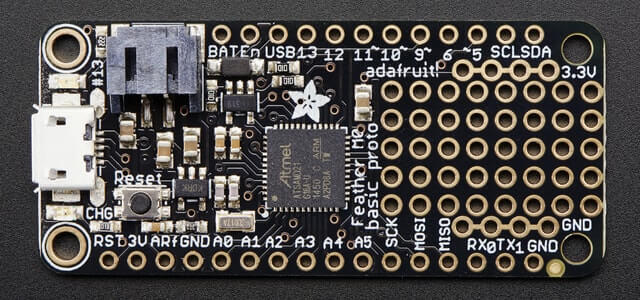
48 MHz ATSAMD21G18A Cortex-M0+, flash 256 KiB, RAM 32 KiB
SERCOM0, pin 0 RX / pin 1 TX, 115200 8N1
I/O 20개와 소형 prototyping area
Part 2
접을 수 있는 영어 원문 전체
영어 원문 전체 펼치기
9F02A53C1C33843FA69DA095BD0E38CBA9E96E39918D921C9D5C701F4A8ABE73
.. _adafruit_feather_m0_basic_proto:

Adafruit Feather M0 Basic Proto
###############################

Overview
********

The Adafruit Feather M0 Basic Proto is a thin, light ARM development
board with an onboard battery connector and charger for 3.7 V lithium
polymer batteries, charging status indicator and user LEDs, native USB
connector, 20 I/O pins, and a small prototyping area.

.. image:: ../../../../../../../boards/adafruit/feather_m0_basic_proto/doc/img/adafruit_feather_m0_basic_proto.jpg
     :align: center
     :alt: Adafruit Feather M0 Basic Proto

Hardware
********

- ATSAMD21G18A ARM Cortex-M0+ processor at 48 MHz
- 32.768 kHz crystal oscillator
- 256 KiB flash memory and 32 KiB of RAM
- Battery connector and charger for 3.7 V lithium polymer batteries
- Charging indicator LED
- User LED
- Reset button
- Native USB port

Supported Features
==================

The adafruit_feather_m0_basic_proto board configuration supports the
following hardware features:

+-----------+------------+------------------------------------------+
| Interface | Controller | Driver/Component                         |
+===========+============+==========================================+
| NVIC      | on-chip    | Nested vector interrupt controller       |
+-----------+------------+------------------------------------------+
| Flash     | on-chip    | Can be used with LittleFS to store files |
+-----------+------------+------------------------------------------+
| SYSTICK   | on-chip    | Systick                                  |
+-----------+------------+------------------------------------------+
| WDT       | on-chip    | Watchdog                                 |
+-----------+------------+------------------------------------------+
| GPIO      | on-chip    | I/O ports                                |
+-----------+------------+------------------------------------------+
| USART     | on-chip    | Serial port                              |
+-----------+------------+------------------------------------------+
| I2C       | on-chip    | Inter-Integrated Circuit                 |
+-----------+------------+------------------------------------------+
| SPI       | on-chip    | Serial Peripheral Interface port         |
+-----------+------------+------------------------------------------+
| USB       | on-chip    | USB device                               |
+-----------+------------+------------------------------------------+

Other hardware features are not currently supported by Zephyr.

The default configuration can be found in the Kconfig file
:zephyr_file:`boards/adafruit/feather_m0_basic_proto/adafruit_feather_m0_basic_proto_defconfig`.

Connections and IOs
===================

The `Adafruit Feather M0 Basic Proto Learn site`_ has detailed
information about the board including `pinouts`_ and the `schematic`_.

System Clock
============

The SAMD21 MCU is configured to use the 32.768 kHz external oscillator
with the on-chip PLL generating the 48 MHz system clock.

Serial Port
===========

The SAMD21 MCU has 6 SERCOM based USARTs.  On the Adafruit Feather M0
Basic Proto, SERCOM0 is the Zephyr console and is available on pins 0
(RX) and 1 (TX).

I2C Port
========

The SAMD21 MCU has 6 SERCOM based USARTs.  On the Adafruit Feather M0
Basic Proto, SERCOM3 is available on pin 20 (SDA) and pin 21 (SCL).

SPI Port
========

The SAMD21 MCU has 6 SERCOM based SPIs.  On the Adafruit Feather M0
Basic Proto, SERCOM4 is available on pin 22 (MISO), pin 23 (MOSI), and
pin 24 (SCK).

USB Device Port
===============

The SAMD21 MCU has a USB device port that can be used to communicate
with a host PC.  See the :ref:`usb-samples` sample applications for
more, such as the :zephyr:code-sample:`usb-cdc-acm` sample which sets up a virtual
serial port that echos characters back to the host PC.

Programming and Debugging
*************************

The Adafruit Feather M0 Basic Proto ships with a BOSSA compatible
SAM-BA bootloader.  The bootloader can be entered by quickly tapping
the reset button twice.

Flashing
========

#. Build the Zephyr kernel and the :ref:`hello_world` sample application:

   .. zephyr-app-commands::
      :zephyr-app: samples/hello_world
      :board: adafruit_feather_m0_basic_proto
      :goals: build
      :compact:

#. Connect the Adafruit Feather M0 Basic Proto to your host computer
   using USB

#. Connect a 3.3 V USB to serial adapter to the board and to the
   host.  See the `Serial Port`_ section above for the board's pin
   connections.

#. Run your favorite terminal program to listen for output. Under Linux the
   terminal should be :code:`/dev/ttyACM0`. For example:

   .. code-block:: console

      $ minicom -D /dev/ttyACM0 -o

   The -o option tells minicom not to send the modem initialization
   string. Connection should be configured as follows:

   - Speed: 115200
   - Data: 8 bits
   - Parity: None
   - Stop bits: 1

#. Tap the reset button twice quickly to enter bootloader mode

#. Flash the image:

   .. zephyr-app-commands::
      :zephyr-app: samples/hello_world
      :board: adafruit_feather_m0_basic_proto
      :goals: flash
      :compact:

   You should see "Hello World! adafruit_feather_m0_basic_proto" in your terminal.

References
**********

.. target-notes::

.. _Adafruit Feather M0 Basic Proto Learn site:
    https://learn.adafruit.com/adafruit-feather-m0-basic-proto/

.. _pinouts:
    https://learn.adafruit.com/adafruit-feather-m0-basic-proto/pinouts

.. _schematic:
    https://learn.adafruit.com/adafruit-feather-m0-basic-proto/downloads
Part 3
한국어 전문 번역
개요
Adafruit Feather M0 Basic Proto는 얇고 가벼운 Arm development board로, 3.7 V lithium polymer battery connector와 charger, charging indicator와 user LED, native USB connector, I/O pin 20개, 작은 prototyping area를 제공합니다.
하드웨어
- 48 MHz ATSAMD21G18A Arm Cortex-M0+ processor
- 32.768 kHz crystal oscillator
- flash memory 256 KiB, RAM 32 KiB
- 3.7 V lithium polymer battery connector와 charger
- charging indicator LED
- user LED
- reset button
- native USB port
지원 기능
adafruit_feather_m0_basic_proto board configuration은 다음 hardware 기능을 지원합니다.
| Interface | Controller | Driver/Component |
|---|---|---|
| NVIC | on-chip | Nested vector interrupt controller |
| Flash | on-chip | LittleFS file 저장에 사용 가능 |
| SYSTICK | on-chip | Systick |
| WDT | on-chip | Watchdog |
| GPIO | on-chip | I/O ports |
| USART | on-chip | Serial port |
| I2C | on-chip | Inter-Integrated Circuit |
| SPI | on-chip | Serial Peripheral Interface port |
| USB | on-chip | USB device |
그 밖의 hardware 기능은 현재 Zephyr에서 지원하지 않습니다. 기본 설정은 boards/adafruit/feather_m0_basic_proto/adafruit_feather_m0_basic_proto_defconfig Kconfig file에서 확인할 수 있습니다.
연결과 I/O
Adafruit Feather M0 Basic Proto Learn site에서 pinout과 schematic을 포함한 자세한 board 정보를 볼 수 있습니다.
System clock
SAMD21 MCU는 32.768 kHz external oscillator를 사용하고 on-chip PLL로 48 MHz system clock을 생성하도록 설정됩니다.
Serial port
SAMD21 MCU에는 SERCOM 기반 USART가 6개 있습니다. 이 board에서는 SERCOM0이 Zephyr console이며 pin 0(RX)과 pin 1(TX)에서 사용할 수 있습니다.
I2C port
SAMD21 MCU에는 SERCOM 기반 USART가 6개 있습니다. 이 board의 SERCOM3은 pin 20(SDA)과 pin 21(SCL)에서 사용할 수 있습니다. 이 문장은 USART라고 표기한 공식 원문을 그대로 옮긴 것입니다.
SPI port
SAMD21 MCU에는 SERCOM 기반 SPI가 6개 있습니다. 이 board의 SERCOM4는 pin 22(MISO), pin 23(MOSI), pin 24(SCK)에서 사용할 수 있습니다.
USB device port
SAMD21 MCU의 USB device port는 host PC와 통신하는 데 사용할 수 있습니다. USB sample, 특히 character를 host PC로 되돌려 보내는 virtual serial port를 구성하는 usb-cdc-acm sample을 참고합니다.
프로그래밍과 디버깅
Adafruit Feather M0 Basic Proto에는 BOSSA-compatible SAM-BA bootloader가 출하 시 설치돼 있습니다. reset button을 빠르게 두 번 누르면 bootloader에 진입합니다.
Flashing
Zephyr kernel과
hello_worldsample을 build합니다.west build -b adafruit_feather_m0_basic_proto samples/hello_world- USB로 board를 host computer에 연결합니다.
- 3.3 V USB-to-serial adapter를 board와 host에 연결합니다. pin 연결은 위의 Serial port 절을 따릅니다.
terminal program으로 output을 기다립니다. Linux에서는 보통
/dev/ttyACM0입니다.$ minicom -D /dev/ttyACM0 -o-ooption은 minicom이 modem initialization string을 보내지 않게 합니다. 연결은 speed 115200, data 8 bit, parity none, stop bit 1로 설정합니다.- reset button을 빠르게 두 번 눌러 bootloader mode에 진입합니다.
image를 flash합니다.
west flash
terminal에 Hello World! adafruit_feather_m0_basic_proto가 표시돼야 합니다.
참고 자료
Source
출처
영어 원문에는 문단, 문서 지시문, 표, 코드, 코드 심벌, 경로를 그대로 보존했습니다.