Part 1
요약·해설
Nitrogen은 nRF52832와 on-board LPC11U35 SWD debugger를 결합해 별도 probe 없이 USB mass-storage drag-and-drop 또는 pyOCD로 flash할 수 있습니다. Zephyr console은 UART와 RTT를 지원하고 Bluetooth radio도 활성화됩니다.
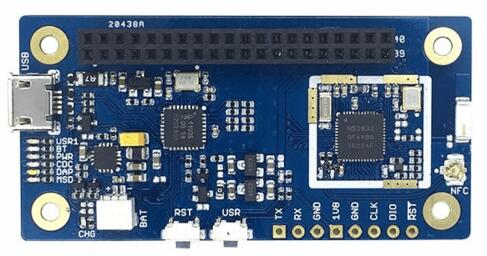
nRF52832 Cortex-M4F, flash 512 KB, RAM 64 KB
Bluetooth LE, NFC, on-board chip antenna
LPC11U35 CMSIS-DAP, USB-UART와 drag-and-drop 지원
Part 2
접을 수 있는 영어 원문 전체
영어 원문 전체 펼치기
726F8A0AFE41D012FAC565729B6854B69CD638DC9D977E864B13FE26D20BA7A1
.. _96b_nitrogen_board:

96Boards Nitrogen
#################

Overview
********

The 96Boards Nitrogen hardware provides support for the Nordic Semiconductor
nRF52832 ARM Cortex-M4F CPU.

.. figure:: ../../../../../../../boards/96boards/nitrogen/doc/img/96b_nitrogen.jpg
     :align: center
     :alt: 96Boards Nitrogen

     96Boards Nitrogen

More information about the board can be found at the `seeed BLE Nitrogen`_
website. The `Nordic Semiconductor Infocenter`_ contains the processor's
information and the datasheet.

Hardware
********

96Boards Nitrogen provides the following hardware components:

- nRF52832 microcontroller with 512kB Flash, 64kB RAM
- ARM |reg| 32-bit Cortex |reg|-M4 CPU with FPU
- Bluetooth LE
- NFC
- LPC11U35 on board SWD debugger

  - SWD debugger firmware
  - USB to UART
  - Drag and Drop firmware upgrade

- 7 LEDs

  - USR1, BT, PWR, CDC, DAP, MSD, Battery charge

- SWD debug connectors

  - nRF52832 SWD connector
  - nRF52832 Uart connector

- On board chip antenna
- 1.8V work voltage
- 2x20pin 2.0mm pitch Low speed connector

Supported Features
==================

The Zephyr 96b_nitrogen board configuration supports the following hardware
features:

+-----------+------------+--------------------------------------+
| Interface | Controller | Driver/Component                     |
+===========+============+======================================+
| NVIC      | on-chip    | nested vectored interrupt controller |
+-----------+------------+--------------------------------------+
| RTC       | on-chip    | system clock                         |
+-----------+------------+--------------------------------------+
| UART      | on-chip    | serial port                          |
+-----------+------------+--------------------------------------+
| GPIO      | on-chip    | gpio                                 |
+-----------+------------+--------------------------------------+
| FLASH     | on-chip    | flash                                |
+-----------+------------+--------------------------------------+
| RADIO     | on-chip    | Bluetooth                            |
+-----------+------------+--------------------------------------+
| RTT       | on-chip    | console                              |
+-----------+------------+--------------------------------------+

Other hardware features have not been enabled yet for this board.
See `Nordic Semiconductor Infocenter`_ for a complete list of nRF52-based
board hardware features.

The default configuration can be found in
:zephyr_file:`boards/96boards/nitrogen/96b_nitrogen_defconfig`

Pin Mapping
===========

LED
---

- LED1 / User LED (green) = P0.29
- LED2 / BT LED (blue) = P0.28

Push buttons
------------

- BUTTON = SW1 = P0.27

External Connectors
-------------------

Low Speed Header

+--------+-------------+----------------------+
| PIN #  | Signal Name | nRF52832 Functions   |
+========+=============+======================+
| 1      | GND         | GND                  |
+--------+-------------+----------------------+
| 3      | UART CTS    | P.014 / TRACEDATA[3] |
+--------+-------------+----------------------+
| 5      | UART TX     | P0.13                |
+--------+-------------+----------------------+
| 7      | UART RX     | P0.15 / TRACEDATA[2] |
+--------+-------------+----------------------+
| 9      | UART RTS    | P0.12                |
+--------+-------------+----------------------+
| 11     | UART TX     | P0.13                |
+--------+-------------+----------------------+
| 13     | UART RX     | P0.15 / TRACEDATA[2] |
+--------+-------------+----------------------+
| 15     | P0.22       | P0.22                |
+--------+-------------+----------------------+
| 17     | P0.20       | P0.20                |
+--------+-------------+----------------------+
| 19     | N/A         | N/A                  |
+--------+-------------+----------------------+
| 21     | N/A         | N/A                  |
+--------+-------------+----------------------+
| 23     | P0.02       | P0.02                |
+--------+-------------+----------------------+
| 25     | P0.04       | P0.04                |
+--------+-------------+----------------------+
| 27     | P0.06       | P0.06                |
+--------+-------------+----------------------+
| 29     | P0.08       | P0.08                |
+--------+-------------+----------------------+
| 31     | P0.16       | P0.16                |
+--------+-------------+----------------------+
| 33     | P0.18       | P0.18                |
+--------+-------------+----------------------+
| 35     | VCC         |                      |
+--------+-------------+----------------------+
| 37     | USB5V       |                      |
+--------+-------------+----------------------+
| 39     | GND         | GND                  |
+--------+-------------+----------------------+

+--------+-------------+----------------------+
| PIN #  | Signal Name | nRF52832 Functions   |
+========+=============+======================+
| 2      | GND         | GND                  |
+--------+-------------+----------------------+
| 4      | PWR BTN     |                      |
+--------+-------------+----------------------+
| 6      | RST BTN     | P0.21 / RESET        |
+--------+-------------+----------------------+
| 8      | P0.26       | P0.26                |
+--------+-------------+----------------------+
| 10     | P0.25       | P0.25                |
+--------+-------------+----------------------+
| 12     | P0.24       | P0.24                |
+--------+-------------+----------------------+
| 14     | P0.23       | P0.23                |
+--------+-------------+----------------------+
| 16     | N/A         | N/A                  |
+--------+-------------+----------------------+
| 18     | N/A         | PC7                  |
+--------+-------------+----------------------+
| 20     | N/A         | PC9                  |
+--------+-------------+----------------------+
| 22     | N/A         | PB8                  |
+--------+-------------+----------------------+
| 24     | P0.03       | P0.03                |
+--------+-------------+----------------------+
| 26     | P0.05       | P0.05                |
+--------+-------------+----------------------+
| 28     | P0.07       | P0.07                |
+--------+-------------+----------------------+
| 30     | P0.11       | P0.11                |
+--------+-------------+----------------------+
| 32     | P0.17       | P0.17                |
+--------+-------------+----------------------+
| 34     | P0.19       | P0.19                |
+--------+-------------+----------------------+
| 36     | NC          |                      |
+--------+-------------+----------------------+
| 38     | NC          |                      |
+--------+-------------+----------------------+
| 40     | GND         | GND                  |
+--------+-------------+----------------------+

More detailed information about the connectors can be found in
`96Boards IE Specification`_.

System Clock
============

nRF52 has two external oscillators. The frequency of the slow clock is
32.768 kHz. The frequency of the main clock is 32 MHz.

Serial Port
-----------

96Boards Nitrogen has one UART, which is used as Zephyr console.
Default settings is 115200 8N1.

I2C
---

96Boards Nitrogen has one I2C. The default I2C mapping for Zephyr is:

- I2C0_SCL : P0.22
- I2C0_SDA : P0.20

SPI
---

96Boards Nitrogen has one SPI. The default SPI mapping for Zephyr is:

- SPI0_NSS  : P0.24
- SPI0_SCK  : P0.26
- SPI0_MISO : P0.25
- SPI0_MOSI : P0.23

Flashing Zephyr onto 96Boards Nitrogen
**************************************

The 96Boards Nitrogen board can be flashed via the `CMSIS DAP`_ interface,
which is provided by the micro USB interface to the LPC11U35 chip.

Using the CMSIS-DAP interface, the board can be flashed via the USB storage
interface (drag-and-drop) and also via `pyOCD`_.

To use ``pyOCD``, install the :ref:`pyocd-debug-host-tools` and make sure they
are in your search path.

Common Errors
=============

No connected boards
-------------------

If you don't use sudo when invoking pyocd-flashtool, you might get any of the
following errors:

.. code-block:: console

   No available boards are connected

.. code-block:: console

   No connected boards

.. code-block:: console

   Error: There is no board connected.

To fix the permission issue, simply add the following udev rule for the
NXP LPC1768 interface:

.. code-block:: console

   $ echo 'ATTR{idProduct}=="0204", ATTR{idVendor}=="0d28", MODE="0666", GROUP="plugdev"' > /etc/udev/rules.d/50-cmsis-dap.rules

Finally, unplug and plug the board again.

ValueError: The device has no langid
------------------------------------

As described by `pyOCD issue 259`_, you might get the
:code:`ValueError: The device has no langid` error when not running
pyOCD as root (e.g. sudo).

To fix the above error, add the udev rule shown in the previous section
and install a more recent version of pyOCD.

Flashing an Application to 96Boards Nitrogen
============================================

Here is an example for the :ref:`hello_world` application. This
requires installing the :ref:`pyocd-debug-host-tools`.

.. zephyr-app-commands::
   :zephyr-app: samples/hello_world
   :board: 96b_nitrogen
   :goals: build flash

Run your favorite terminal program to listen for output.

.. code-block:: console

   $ minicom -D <tty_device> -b 115200

Replace :code:`<tty_device>` with the port where the board 96Boards Nitrogen
can be found. For example, under Linux, :code:`/dev/ttyACM0`.
The ``-b`` option sets baud rate ignoring the value from config.

Press the Reset button and you should see the following message in your
terminal:

.. code-block:: console

   Hello World! arm

Debugging with GDB
==================

You can debug an application in the usual way.  Here is an example for the
:ref:`hello_world` application. This also requires pyOCD.

.. zephyr-app-commands::
   :zephyr-app: samples/hello_world
   :board: 96b_nitrogen
   :maybe-skip-config:
   :goals: debug

.. _pyOCD:
    https://github.com/mbedmicro/pyOCD

.. _CMSIS DAP:
    https://developer.mbed.org/handbook/CMSIS-DAP

.. _Nordic Semiconductor Infocenter:
    http://infocenter.nordicsemi.com/

.. _seeed BLE Nitrogen:
    http://wiki.seeed.cc/BLE_Nitrogen/

.. _pyOCD issue 259:
    https://github.com/mbedmicro/pyOCD/issues/259

.. _96Boards IE Specification:
    https://linaro.co/ie-specification
Part 3
한국어 전문 번역
개요
96Boards Nitrogen hardware는 Nordic Semiconductor nRF52832 Arm Cortex-M4F CPU를 지원합니다. 자세한 보드 정보는 Seeed BLE Nitrogen website에서, processor 정보와 datasheet는 Nordic Semiconductor Infocenter에서 확인할 수 있습니다.
하드웨어
- flash 512 KB와 RAM 64 KB를 갖춘 nRF52832 microcontroller
- FPU를 갖춘 Arm 32-bit Cortex-M4 CPU
- Bluetooth LE와 NFC
- on-board LPC11U35 SWD debugger: SWD firmware, USB-to-UART, drag-and-drop firmware upgrade
- LED 7개: USR1, BT, PWR, CDC, DAP, MSD, battery charge
- nRF52832 SWD connector와 UART connector
- on-board chip antenna
- 동작 전압 1.8 V
- 2×20 pin, 2.0 mm pitch Low Speed connector
지원 기능
| Interface | Controller | Driver/Component |
|---|---|---|
| NVIC | on-chip | nested vectored interrupt controller |
| RTC | on-chip | system clock |
| UART | on-chip | serial port |
| GPIO | on-chip | gpio |
| FLASH | on-chip | flash |
| RADIO | on-chip | Bluetooth |
| RTT | on-chip | console |
그 밖의 하드웨어 기능은 이 보드에서 아직 활성화되지 않았습니다. nRF52 hardware 전체 기능은 Nordic Semiconductor Infocenter를 참고합니다. 기본 설정 파일은 boards/96boards/nitrogen/96b_nitrogen_defconfig입니다.
Pin mapping
LED
LED1 / User LED (green) = P0.29LED2 / BT LED (blue) = P0.28
Push button
BUTTON = SW1 = P0.27
Low Speed Header 홀수 pin
| PIN # | Signal Name | nRF52832 Functions |
|---|---|---|
| 1 | GND | GND |
| 3 | UART CTS | P.014 / TRACEDATA[3] |
| 5 | UART TX | P0.13 |
| 7 | UART RX | P0.15 / TRACEDATA[2] |
| 9 | UART RTS | P0.12 |
| 11 | UART TX | P0.13 |
| 13 | UART RX | P0.15 / TRACEDATA[2] |
| 15 | P0.22 | P0.22 |
| 17 | P0.20 | P0.20 |
| 19 | N/A | N/A |
| 21 | N/A | N/A |
| 23 | P0.02 | P0.02 |
| 25 | P0.04 | P0.04 |
| 27 | P0.06 | P0.06 |
| 29 | P0.08 | P0.08 |
| 31 | P0.16 | P0.16 |
| 33 | P0.18 | P0.18 |
| 35 | VCC | |
| 37 | USB5V | |
| 39 | GND | GND |
Low Speed Header 짝수 pin
| PIN # | Signal Name | nRF52832 Functions |
|---|---|---|
| 2 | GND | GND |
| 4 | PWR BTN | |
| 6 | RST BTN | P0.21 / RESET |
| 8 | P0.26 | P0.26 |
| 10 | P0.25 | P0.25 |
| 12 | P0.24 | P0.24 |
| 14 | P0.23 | P0.23 |
| 16 | N/A | N/A |
| 18 | N/A | PC7 |
| 20 | N/A | PC9 |
| 22 | N/A | PB8 |
| 24 | P0.03 | P0.03 |
| 26 | P0.05 | P0.05 |
| 28 | P0.07 | P0.07 |
| 30 | P0.11 | P0.11 |
| 32 | P0.17 | P0.17 |
| 34 | P0.19 | P0.19 |
| 36 | NC | |
| 38 | NC | |
| 40 | GND | GND |
connector의 자세한 정보는 96Boards IE Specification을 참고합니다.
System clock
nRF52에는 external oscillator가 두 개 있습니다. slow clock은 32.768 kHz, main clock은 32 MHz입니다.
Serial port
Nitrogen에는 Zephyr console로 사용하는 UART가 하나 있으며 기본 설정은 115200 8N1입니다.
I2C
I2C 하나의 기본 mapping은 I2C0_SCL: P0.22, I2C0_SDA: P0.20입니다.
SPI
SPI 하나의 기본 mapping은 다음과 같습니다.
SPI0_NSS: P0.24SPI0_SCK: P0.26SPI0_MISO: P0.25SPI0_MOSI: P0.23
Nitrogen에 Zephyr flashing
micro-USB를 통해 LPC11U35가 제공하는 CMSIS-DAP interface로 flash할 수 있습니다. USB storage에 drag-and-drop하거나 pyOCD를 사용할 수 있습니다. pyOCD를 쓰려면 pyOCD Debug Host Tools를 설치하고 실행 파일이 search path에 있어야 합니다.
일반 오류: 연결된 board 없음
pyocd-flashtool을 sudo 없이 실행하면 다음 오류 중 하나가 나타날 수 있습니다.
No available boards are connected
No connected boards
Error: There is no board connected.
권한 문제를 해결하려면 NXP LPC1768 interface용 다음 udev rule을 추가합니다.
$ echo 'ATTR{idProduct}=="0204", ATTR{idVendor}=="0d28", MODE="0666", GROUP="plugdev"' > /etc/udev/rules.d/50-cmsis-dap.rules그 뒤 board의 USB를 뽑았다 다시 연결합니다.
ValueError: The device has no langid
pyOCD issue 259에 설명된 것처럼 pyOCD를 root 권한으로 실행하지 않으면 이 오류가 날 수 있습니다. 앞 절의 udev rule을 추가하고 더 최신 pyOCD를 설치합니다.
애플리케이션 flash
다음 hello_world 예에는 pyOCD Debug Host Tools가 필요합니다.
# Zephyr 저장소 루트에서
west build -b 96b_nitrogen samples/hello_world
west flash
원하는 terminal program으로 출력을 수신합니다.
$ minicom -D <tty_device> -b 115200<tty_device>를 Nitrogen이 연결된 port로 바꿉니다. Linux에서는 예를 들어 /dev/ttyACM0입니다. -b option은 설정값과 무관하게 baud rate를 지정합니다. Reset button을 누르면 다음 메시지가 보여야 합니다.
Hello World! armGDB debugging
일반적인 방식으로 debug할 수 있으며 다음 예도 pyOCD가 필요합니다.
# Zephyr 저장소 루트에서
west build -b 96b_nitrogen samples/hello_world
west debug
참고 자료
- pyOCD
- CMSIS-DAP
- Nordic Semiconductor Infocenter
- Seeed BLE Nitrogen
- pyOCD issue 259
- 96Boards IE Specification
Source
출처
영어 원문에는 문단, 문서 지시문, 표, 코드, 코드 심벌, 경로를 그대로 보존했습니다.